5 Best Multi Location Product Management Plugins for WooCommerce
Multi-location inventory in WooCommerce helps store owners track stock across different warehouses or shops using one simple system. It keeps product counts accurate and prevents confusion when items move between locations. This setup supports growing businesses that need clear stock visibility everywhere. It also improves order management and keeps customers informed with correct availability.
Among the 5 best multi location product management plugins for WooCommerce are Multi Location Product & Inventory Management for WooCommerce, ATUM Inventory, WooMultistore, StockUpp Inventory, and MultiLoca – WooCommerce Multi Locations Inventory. These plugins help you control stock, pricing, and availability for multiple stores or warehouses accurately and efficiently.
Explore this list to find tools that simplify inventory work. Learn which features matter most for multi-location stores. Keep reading to choose the right plugin with confidence.
How Does the Multi Location Product Management Plugin for WooCommerce Benefit You?
Running products across different store locations can feel confusing when everything must stay updated and correct. Many store owners face problems when stock changes quickly in busy places. A simple tool can help avoid these issues easily. Here is how the multi location product management plugin for WooCommerce can benefit you.
Easy Stock Updates
Managing stock in different places becomes much simpler because you do not have to change everything by hand. You can update the quantity for each store, and the system will instantly show the correct amount. This helps you avoid selling items that are not available. It also keeps every store updated without wasting time. With fewer mistakes, your customers get their orders without any delays.
Location-Based Product Control
More than one store often means some products stay in stock in one place but not in another. This feature lets you set product details for each store on its own. You can pick which store sells a product and set different prices if needed. Everything stays clear and organized. It also helps you handle busy stores better because each location follows its own settings based on local demand.
Faster Order Handling
When an order comes in, the system checks which store has the item and can deliver it quickly. This avoids confusion between branches and helps you ship items from the best place. It also reduces extra delivery time because the order goes out from the nearest store. Your customers receive their orders faster, which makes them happier and more likely to buy again.
Better Team Roles
You can allow each store manager to handle only the location you choose. This way, they cannot change details from other stores. It makes responsibilities clear and reduces mistakes. Every manager focuses on their own store, which helps everything run more smoothly. When tasks are divided properly, the entire system becomes more organized.
Clear Stock Visibility
Customers can only see items that are available near them, so they do not place orders that cannot be delivered. This improves trust because people know they are buying real, available items. It also reduces canceled orders since the stock information is always correct. Showing the right details helps customers shop with confidence and enjoy a smoother experience.
Simple Product Management
Even if you have many stores, you can control everything from one place. You do not need to switch between different systems or screens. This saves a lot of time and reduces confusion. The Multi Location Product Management for WooCommerce helps you stay in control without feeling overwhelmed. It keeps everything neat and easy to understand for daily work.
Improved Store Efficiency
When every store works with updated stock, accurate product details, and faster shipping decisions, the entire business becomes more efficient. There is less confusion, fewer errors, and smoother communication between branches. This lets you focus on improving sales instead of fixing problems. A good organization creates a stable system that supports long-term growth for your store.
5 Best Multi Location Product Management Plugins for WooCommerce
Many store owners need simple tools that help them manage products across different locations without stress. These tools save time and improve daily work for all teams. They also help stores avoid mistakes during busy hours. Here are the five best options today.
1. Multi Location Product & Inventory Management for WooCommerce
This plugin gives store owners clean tools that help them manage product stock across many locations easily. Every store updates items quickly and avoids errors that confuse customers. Teams enjoy clear product details that improve daily work. This simple design helps everyone stay focused and organized.
2. ATUM Inventory Management
ATUM offers strong tools that help users track products across different stores with clear controls. Store teams change stock quickly and handle items without confusion. The clean dashboard gives fast updates that help everyone work better. Many users like the simple style that keeps tasks smooth.
3. WooMultistore Plugin
WooMultistore connects many stores and gives users one place that control product details across all locations. It helps owners update items fast and avoid stressful mistakes during busy times. The tool also links stores together with strong syncing that saves time. Many owners enjoy its easy design.
4. StockUpp Inventory Management
StockUpp gives users simple tools that help them manage product stock across different locations with clear steps. Every update happens quickly and keeps stores running smoothly. Teams handle items faster and avoid issues that slow sales. The design stays clean and supports users who want simpler product control.
5. MultiLoca – WooCommerce Multi Locations Inventory
MultiLoca gives store owners an easy way to manage stock across many places without confusion. Each location keeps its own stock count, and updates stay quick and smooth. The clean layout helps teams pick the right stock source and keep daily work simple.
Key Features to Look for in a Multi-Location Management Plugin
When you manage many store locations, using the right plugin can save time and prevent stock mistakes. A good plugin gives clear tools and smooth features that help every store run better. Here are the key things you should always check first.
- Location-based stock: This lets you set stock for each store easily. It keeps your items organized and updated clearly.
- Separate pricing rules: Set different product prices by store if needed. This helps you manage discounts or local pricing better.
- Auto order routing: Orders go to the store nearest to the customer. This reduces delivery time and avoids confusion.
- Store manager roles: Give each store manager access only to their location. It keeps control tight and mistakes low.
- Stock visibility control: Show stock to customers based on their area. It stops people from buying unavailable items.
- Easy product sync: Sync all product data across stores with one click. It saves time and prevents repeated changes.
- Shipping by location: Set delivery charges based on the store or region. It gives better control over shipping costs.
- One dashboard view: Control all your store locations from one place. This helps you work faster and fix issues quickly.
- Store locator tool: Show your customers where stores are nearby. It helps them choose the best pickup or delivery spot.
- Quick setup tools: Use simple steps to install and run the plugin. It works without needing any coding knowledge.
Common Challenges You’ll Face Without the Multi-Location Plugin
Handling many stores without the right tools creates problems that slow your work and hurt sales. Stock updates become messy and hard to trust. Simple tasks start taking too long each day. These issues keep growing when your store expands into more locations. These are the common challenges you’ll face without this plugin.
Inaccurate Stock Visibility
Wrong stock numbers often appear because updates do not happen on time across busy locations. This leads to overselling, which quickly confuses customers. Many stores deal with situations where products look available online even though shelves are completely empty.
Manual Update Errors
Mistakes begin to pile up when stock is updated by hand during hectic work hours. Incorrect numbers spread across locations and create even bigger issues. These errors often waste time and add unnecessary stress, especially when working with many suppliers every week.
Hard Location Tracking
Tracking items becomes difficult when several stores operate with limited tools. Missing or incomplete data slows down decisions at important moments. Many teams feel unsure because they cannot easily figure out which branch has certain products.
No Real-Time Sync
Important stock changes are missed when the system fails to refresh instantly across all locations. This becomes a bigger problem during sales or promotions where items move fast. Many stores end up double-checking numbers repeatedly because they never feel fully accurate.
Slow Order Fulfillment
Orders often get sent from the wrong locations when smart routing tools are missing. This leads to slower deliveries and quickly damages customer trust. Extra shipping costs also add up, making the process more expensive than it should be.
Poor Scalability Options
Growth becomes harder when tools cannot keep up with new locations or increasing stock. Inventory tracking becomes shaky, especially during busy seasons. Many stores also miss out on useful data insights because reporting tools fail to support multiple channels.
Customer Dissatisfaction Risk
Complaints rise when delivery delays or stock errors keep happening. Trust drops fast when customers do not receive clear or accurate updates. Many shoppers choose not to return after facing repeated issues with inventory accuracy.
How Multi-Location Plugins Improve Customer Experience?
When customers shop online, they want clear details that help them choose without confusion. Stores that update information well create a smooth buying experience. Simple tools can make these updates faster and more accurate. This helps customers feel more confident while shopping. Here is how.
Real-Time Stock
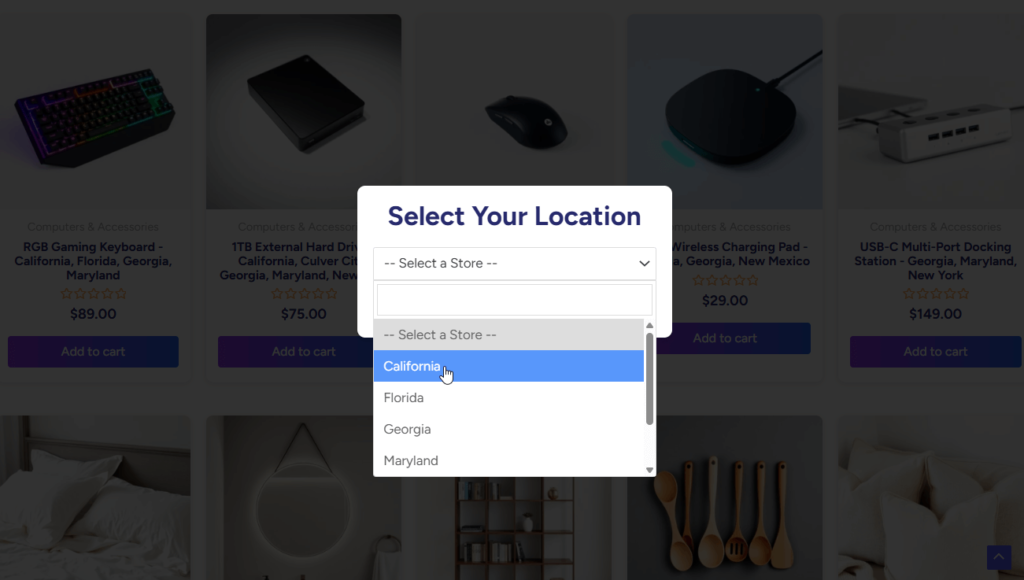
Customers feel more secure once they see stock that matches their location. They understand that the product they pick is truly available and ready to ship fast. This prevents canceled orders and wasted time. Real-time stock updates keep the shopping process smooth because customers always get honest details. It also helps stores build trust with every order.
Faster Delivery
Orders sent from the closest store reach customers much sooner. Shorter waiting times make the whole experience feel better and more reliable. This helps a lot in busy cities where distance plays a big role. Faster delivery also cuts down on common shipping mistakes. Quick arrivals leave customers more satisfied and confident in the store.
Clear Product Details
Every store location can show the right product details that match local stock. Customers do not see items from far locations that cannot deliver to them. This keeps the shopping page easy to understand and clean. Clear information helps customers make decisions faster without feeling confused. It also reduces complaints and returns because everything stays accurate and simple.
Fewer Order Mistakes
When stores handle multiple locations, mistakes can happen easily if the system isn’t organized. A multi-location tool reduces errors by sending each order to the correct store. Customers get the right items without delays or mix-ups. This helps them trust the store more with every purchase. When mistakes drop, overall satisfaction climbs higher with time.
Better Store Choice
Customers love choosing the store that works best for them. They can pick a nearby branch that offers quick pickup or faster delivery. This freedom makes buying feel easier and more flexible. It also helps customers avoid long travel or high shipping costs. A simple store choice feature improves comfort and convenience for everyone.
Accurate Shipping Costs
Shipping prices that match the customer’s location make checkout feel fair and honest. There are no surprise fees that cause people to leave at the last step. Clear pricing helps customers plan better and reduces confusion that leads to abandoned carts. Accurate costs create a smoother checkout experience for everyone.
Better Communication
Updates sent from the correct store make the whole process feel more organized. Customers receive clear messages about order status, delivery times, or pickup options. These details keep them calm and well-informed. Strong communication builds trust that encourages repeat purchases and creates a friendly, reliable shopping experience.
Wrap Up
Running many stores can be confusing if your tools are not simple. The 5 best multi location product management plugins for WooCommerce give you easy ways to fix this. They help you track stock, set prices, and send orders from the right store without extra work.
These plugins also keep your team focused and your customers happy. You do not need to jump between systems or guess stock levels. Everything is in one place and easy to control. If your store is growing, these tools will save time and reduce mistakes. Pick the one that fits your needs and make managing products easier every day.