AI Music That Starts With Your Words: A Practical Look at an AI Song Generator
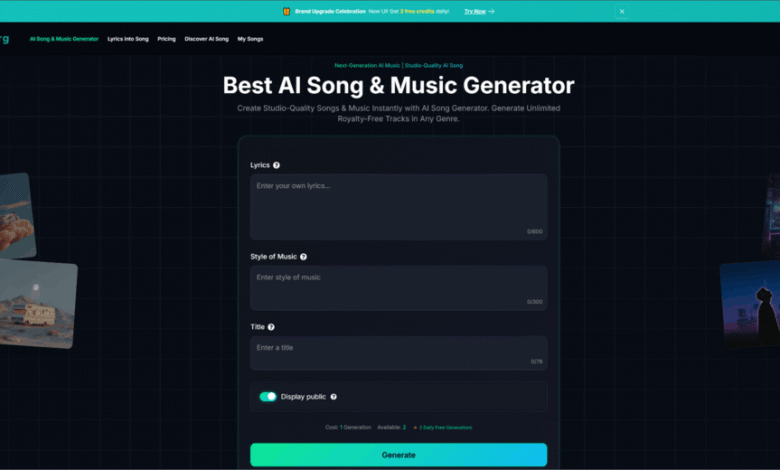
If you have ever tried to turn a clear idea in your head into an actual track, you already know the gap: inspiration arrives quickly, but arrangement, melody, and production take time. That gap is where an AI Song Generator can feel surprisingly useful—not as a replacement for musicianship, but as a fast way to explore musical directions when you do not have hours to spare.
In my own testing, what stood out was not “instant perfection,” but the speed of iteration. I could describe a mood and a genre, toggle an instrumental option, and get something listenable quickly enough to judge whether the idea had legs. It felt less like pressing a magic button and more like working with a sketch artist: you still need taste, clear prompts, and multiple passes, but the first draft arrives earlier than it otherwise would.

What Problem It Actually Solves (And Why That Matters)
Many people assume music creation is blocked by creativity. In practice, the bottleneck is often translation:
- You can explain the vibe in words, but you cannot immediately “play” it.
- You can write lyrics, but arranging them into a coherent song takes production skill.
- You can imagine a hook, but building the full structure (intro, verse, chorus, bridge) is slow.
PAS: The Everyday Workflow Pain
- Problem: You need music for a video, a prototype, a pitch, or personal release—but production is time-heavy.
- Agitation: Waiting weeks for a draft (or struggling with a DAW) can kill momentum; you settle for generic stock music.
- Solution: A generator turns plain-language intent into a musical draft so you can decide “keep going” or “change direction” quickly.
How It Works in Plain Terms
At a high level, an AI music generator takes your text description (genre, tempo, instrumentation, emotion, use case) or lyrics and produces a song draft by synthesizing musical elements such as:
- Melody and motifs (the “lead idea” you remember)
- Harmony (chord movement that supports the melody)
- Rhythm and groove (drums and pacing)
- Arrangement choices (what enters when, and how sections change)
In my use, the best results came from prompts that were concrete: “tempo range,” “primary instruments,” “energy curve,” and “reference mood” worked better than abstract poetry alone.
Two Practical Workflows: Description-to-Music vs Lyrics-to-Song
1) Description-to-Music (Fast Drafting)
This is the most direct route when you need background music or a quick demo. You describe the mood and style, optionally request instrumental output, and generate.
What I noticed:
- For “lofi,” “ambient,” and simple pop structures, results were often coherent on the first or second try.
- For more complex genre fusions, I usually needed a few generations to stabilize the groove and instrumentation.
2) Lyrics-to-Song (Turning Words Into a Structured Track)
If you already have lyrics, the generator attempts to map them into phrasing, cadence, and a song structure. This is where constraints become real: the model has to balance intelligibility, rhythm, and arrangement.
What I noticed:
- Shorter, rhythmically consistent lines tended to sing more naturally.
- If the lyrics had irregular meter, the vocal phrasing sometimes sounded forced, and a rewrite (or a different prompt) helped.
Where It Fits in a Real Creative Pipeline
A useful way to think about the tool is “draft acceleration,” not “final production.”
Before: Traditional Workflow
- Idea → open DAW → pick instruments → find chord progression → build drums → test melody → arrange → mix → revise
After: Generator-Assisted Workflow
- Idea → generate 2–6 drafts quickly → pick the best direction → refine prompt or lyrics → export → (optional) finish in DAW or with a musician
In practice, the second workflow changes the emotional experience. You spend less time staring at a blank timeline and more time choosing between concrete options.
Feature-Level Comparison (Why This Product Feels Different in Use)
| Comparison Item | AI Song Maker | Traditional DAW Workflow | Hiring a Composer/Producer | Generic Stock Music |
| Time to first usable draft | Minutes (varies by queue and iterations) | Hours to days (skill-dependent) | Days to weeks | Immediate |
| Iteration speed | High: prompt → regenerate | Medium: manual edits | Medium: back-and-forth rounds | Low: limited choices |
| Creative control | Medium: prompt-guided control | High: full control | High (shared control) | Low |
| Lyrics-to-song capability | Available (quality varies by lyric meter) | Manual (requires vocal writing skill) | Strong (human interpretation) | Not applicable |
| Instrumental mode | Often supported | Always possible | Always possible | Yes |
| Cost predictability | Plan-based / usage-based patterns | Software/time cost | High cost per project | Subscription/licensing cost |
| Learning curve | Lower (writing prompts) | Higher (production skills) | Low (but requires briefing) | Low |
| “Ownership / licensing clarity” | Review terms carefully; details matter | You own what you create | Contract-based | License-dependent |
| Best use case | Prototyping, content drafts, ideation | Final production, detailed sound design | High-stakes releases | Background filler |
My Observations From Testing: What Improves Results
Prompt Specificity Wins
When I used prompts like:
- “mid-tempo pop, 110–120 bpm, bright synths, clean kick, uplifting chorus”
the results were more stable than:
- “make something inspiring and modern.”
Structure Guidance Helps
Including a rough structure improved coherence:
- “Intro 4 bars → Verse 8 bars → Chorus 8 bars → Bridge 8 bars → Chorus 8 bars”
Instrumentation Constraints Reduce Randomness
Stating “guitar + soft drums + warm bass” produced fewer distracting elements than leaving instrumentation open-ended.
Limitations (The Honest Part That Makes It More Credible)
Even with strong prompts, there are constraints you should expect.
1) Prompt Sensitivity
Small wording changes can meaningfully alter the output. In my runs, switching “melancholic” to “nostalgic” sometimes changed the chord color and pacing more than I anticipated.
2) Multiple Generations Are Normal
It is common to generate several drafts before you hear “the one.” Treat the first outputs like sketches, not verdicts.
3) Vocal Artifacts Can Appear
If a track includes vocals, intelligibility and tone may vary. Sometimes the vocal phrasing is strong but the pronunciation is imperfect, or vice versa.
4) Licensing Terms Deserve a Careful Read
If you plan to use the output commercially (ads, distribution platforms, client work), it is prudent to read the product’s usage and ownership terms closely. In general, “royalty-free” marketing language can coexist with detailed platform terms, and the exact permission boundary matters.
How to Use It Without Becoming Over-Reliant
A balanced approach looks like this:
- Use the generator for direction finding: mood, groove, arrangement ideas.
- Keep human judgment for selection and refinement: choosing what is musically interesting, trimming sections, and ensuring brand fit.
- When needed, bring drafts into a DAW (or a collaborator) for final polish.
This way, the tool becomes a creativity amplifier rather than a creativity substitute.
A Neutral Reference for Context
If you want a broader, non-marketing view of how generative AI is progressing across creative domains (including audio), it can help to read neutral overviews such as the Stanford HAI AI Index reports, which discuss trends, capabilities, and adoption without being tied to one specific product.
Who This Is Best For
Creators Who Need Speed
- Short-form video creators, marketers, indie builders, educators, podcasters
Writers With Lyrics But No Production Setup
- People who can write words but want a quick musical framing to test cadence and structure
Teams Prototyping Brand Sound
- Early-stage teams exploring “what our sound could be” before committing to a composer
A Practical Closing Thought
An AI music generator is not a shortcut to taste. What it gives you is motion—the ability to move from an idea to a draft fast enough that your creative energy stays intact. When used as a drafting partner, it can make music creation feel less like a long uphill build and more like a series of informed choices.
If You Want Better Outputs in Fewer Attempts
Try this prompt template:
- Genre + bpm + mood + primary instruments + structure + “avoid” list (what you do not want)
Example “Avoid” List
- “avoid heavy distortion, avoid overly busy hi-hats, avoid abrupt tempo shifts”
Final Note
The best results I heard came from treating each generation as data: listen, name what worked, adjust one variable, and iterate. That mindset turns the tool into a reliable creative workflow rather than a lottery ticket.
Disclaimer
Your results will vary by prompt quality, genre complexity, and generation attempts; consider the output a starting point for refinement rather than a finished master.