Stop Settling for Stock Audio: How to Get Cinema-Quality Soundtracks on an Indie Budget
Being an indie game developer means wearing too many hats. You might nail the art style and gameplay, but if the sound is generic, the immersion breaks instantly. For years, you had two bad options: burn your budget on a professional composer or use the same royalty-free tracks everyone else uses. That era is ending. With a modern AI Music Generator, you can now produce original, studio-quality scores on a shoestring budget. Musick AI is leading this shift, giving small teams the power to sound like major studios without the heavy price tag.
I. The New Standard for Game Audio Assets
The concept of an AI Music Generator might sound like a novelty to some, but for the game industry, it is becoming a production pipeline standard. The core issue with traditional stock music is the lack of specificity. If you are building a cyberpunk detective game set in a rainy neon city, searching for “mystery music” on a stock site yields generic orchestral tracks that don’t fit the vibe.
Musick AI functions differently. Instead of searching a static library, it synthesizes new audio based on precise instructions. It creates the track from scratch. This means the resulting audio is unique to that specific query. For a developer, this solves the “asset flip” look and feel. When a player hears the soundtrack, they are hearing something composed for that moment, not a file bought in a humble bundle.
Using an AI Music Maker like this allows for rapid prototyping. In the early stages of a game, placeholder art is common, but placeholder audio often stays in the build far too long because replacing it is difficult. Now, generating a polished “v1.0” track takes minutes, allowing the audio to evolve alongside the visual fidelity of the project.
II. Navigating the Creation Modes for Maximum Control
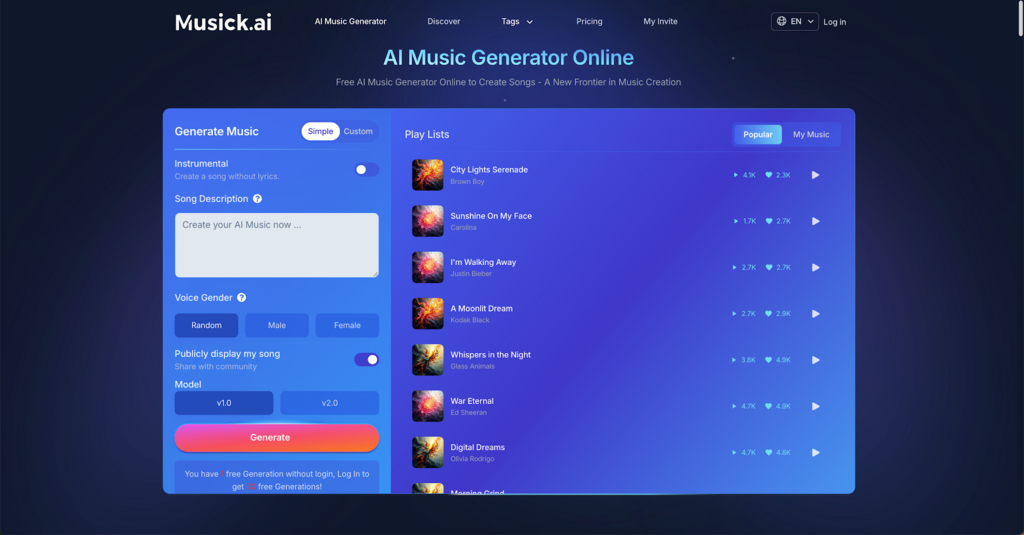
A tool is only as good as the control it offers the user. Musick AI provides specific modes that cater to different needs within game development. Understanding these distinct workflows is key to getting the best output.
The “Simple” Mode for Quick Atmosphere
For menu music, loading screens, or ambient background noise, the “Simple” mode is efficient. It relies purely on text prompts. A developer can type “eerie wind sounds with distant bells and a slow cello drone” to create music that fills the silence without dominating the player’s attention. This creates an immediate mood foundation.
The “Custom” Mode for Narrative Depth
Narrative-driven games often require more structure. The “Custom” mode on Musick AI allows for granular control. Here, users can input specific lyrics (or use the auto-generation feature for vocals) and select a precise style. While many games rely on instrumentals, adding a vocal track to a credit sequence or a specific character’s theme can elevate the production value significantly.
Instrumental Generation
This is perhaps the most critical feature for game developers. An AI Song Maker often defaults to pop songs with vocals, which clash with gameplay dialog. Musick AI includes a dedicated toggle for instrumental generation. This ensures the output is purely musical—beats, melodies, and harmonies—without a synthesized voice talking over the game’s narrator or sound effects.
III. Mastering the Genre and Style Parameters
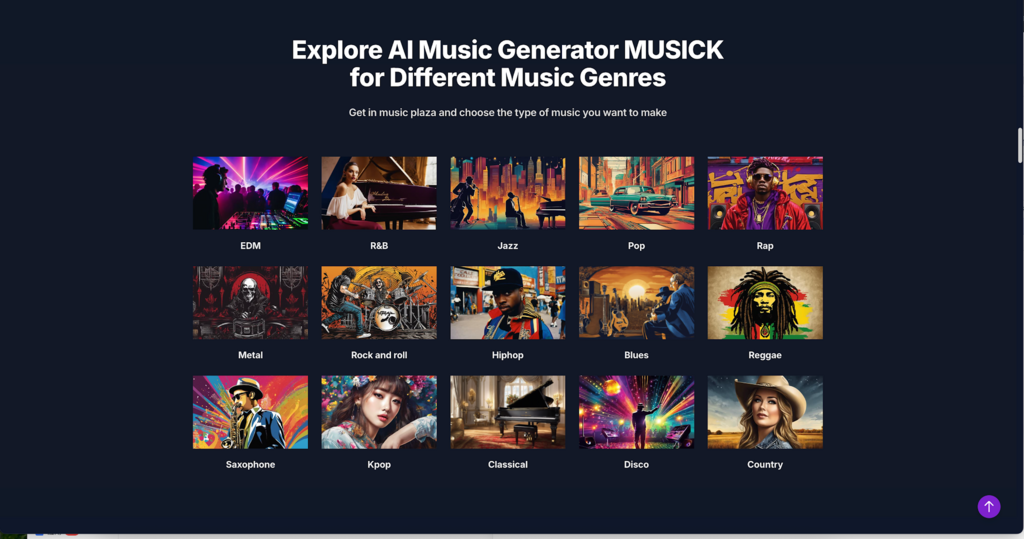
One of the strongest features of Musick AI is its diverse genre training. A game’s soundtrack creates its identity, and mixing genres can often yield the most memorable results. The platform supports a wide array of distinct styles, including EDM, R&B, Jazz, Pop, Rap, Metal, Rock, Hip-hop, Blues, Reggae, and even specific niches like Saxophone, Kpop, Classical, Disco, and Country.
Matching Genre to Gameplay Loop
- Action and Shooters: Genres like Metal and Rock are staples here. High-tempo, aggressive guitar riffs drive player adrenaline. Using the AI Song Generator capabilities, a developer can request “fast-paced industrial metal with heavy distortion” to sync with a boss fight.
- Strategy and RPGs: Classical and Jazz work well for complex, thoughtful gameplay. A “soothing lo-fi jazz piano” track can make inventory management or city-building relaxing rather than tedious.
- Narrative Adventures: Blues or Saxophone-focused tracks can inject noir or emotional weight into cutscenes.
Model Versions and Duration
The platform offers different model versions (v1.0, v2.0), allowing users to experiment with different rendering engines. If one model produces a melody that is too complex, switching to another might yield a cleaner result. Furthermore, controlling the song description allows the AI to understand the structure required. Describing the track as “a looping village theme with a flute melody” helps the system understand the intended use case is a background loop, not a radio single.
IV. A Practical Workflow: From Prompt to File
How does one actually make music using this tool? The process is designed to be as frictionless as possible, removing the technical barriers of mixing and mastering.
- Define the Goal: Start with a clear idea. Is this a battle theme or a sad ending track?
- Draft the Prompt: In the “Song Description” field, be descriptive. Instead of just “sad music,” try “melancholic piano ballad, slow tempo, minor key, emotional and cinematic.”
- Select Parameters: Choose “Instrumental” if vocals aren’t needed. Select the genre tag that fits best (e.g., Classical).
- Generate and Iterate: Click generate. The system produces a track. If it’s not perfect, tweak the prompt. Maybe add “more reverb” or “remove the drums.”
- Download and Implement: Once satisfied, the track can be downloaded. Musick AI allows for high-quality downloads, ensuring the audio doesn’t sound compressed when imported into engines like Unity or Unreal.
This iterative process is where the power lies. A developer can generate five variations of a “forest level theme” in the time it would take to email a composer for a quote.
V. Conclusion
The role of the indie developer is changing. It is no longer about doing everything yourself from scratch; it is about curating the best assets to build a cohesive experience. Musick AI offers a solution that solves one of the most persistent pain points in development. By allowing creators to create music that is custom, affordable, and legally safe, it frees up time and budget to focus on what matters most: the gameplay.
Whether you need a thumping techno beat for a racing game or a sorrowful violin piece for a visual novel, the technology is now accessible. The era of silent games or mismatched stock audio is over. With the right tools, every indie game can sound like a blockbuster.