What Is an AI Image Editor? Who Should Use It and How to Get Started?
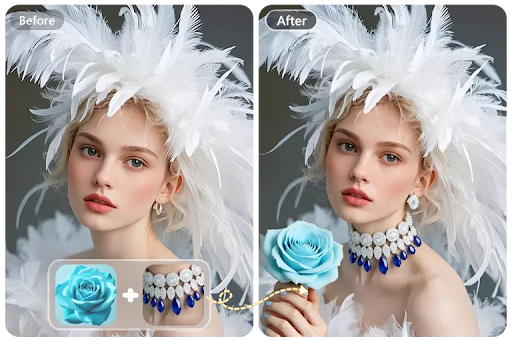
AI Image Editor tools are rapidly becoming a core part of modern digital workflows. Whether you are creating content, managing product images, or simply editing personal photos, the need for faster and simpler solutions is growing. An AI Image Editor allows users to perform complex edits automatically, reducing the time and effort traditionally required.
For many people, traditional editing tools feel overwhelming. They require technical knowledge, time, and patience. This is why AI Image Editor solutions are gaining popularity. By automating tasks like background removal, image enhancement, and resizing, an AI Image Editor makes professional-quality editing accessible to everyone.
As more users explore AI-powered tools, an important question arises: what exactly is an AI Image Editor, who is it best suited for, and how can you start using one effectively? This guide will walk you through everything you need to know.
What Is an AI Image Editor and Why It Matters
AI-Powered Editing Made Simple
An AI Image Editor is a tool that uses artificial intelligence to automate image editing tasks. Instead of manually adjusting layers, masks, or settings, users can rely on AI to analyze and modify images intelligently.
This means that tasks such as removing backgrounds, enhancing image quality, or cleaning up unwanted elements can be completed in just a few clicks. The AI understands the structure of the image and applies changes in a natural and consistent way.
Key Features of AI Image Editor Tools
AI Image Editor platforms typically offer a range of features designed to simplify workflows:
- Background removal and replacement
- Image enhancement and upscaling
- Object removal (e.g., watermarks or unwanted elements)
- Automatic resizing and ratio adjustment
- Style transformation and visual effects
These features eliminate the need for manual editing, making the process faster and more efficient.
Advantages Over Traditional Editing Tools
Compared to traditional tools like Photoshop, AI Image Editor solutions provide several key advantages:
- Speed: Complete edits in seconds
- Ease of use: No learning curve required
- Efficiency: Reduce repetitive manual work
- Accessibility: Suitable for beginners and professionals
These benefits make AI Image Editor tools especially valuable for users who prioritize speed and simplicity.
Who Should Use AI Image Editor and Why
AI Image Editor tools are not limited to professional designers. They are designed to solve real problems for a wide range of users. Below are key groups that benefit the most and how these tools help them.
Content Creators and Social Media Users
Content creators need to produce high-quality visuals consistently. Editing images manually can slow down content production.
With an AI Image Editor, creators can quickly enhance images, adjust formats for different platforms, and generate variations. This allows them to maintain a consistent posting schedule without spending too much time on editing.
Ecommerce Sellers and Online Businesses
Ecommerce businesses rely heavily on visual presentation. Poor-quality images can reduce trust and impact sales.
AI Image Editor tools help sellers:
- Remove backgrounds from product images
- Improve image clarity and lighting
- Create consistent visuals across listings
This improves efficiency and helps businesses scale their operations.
Marketing Teams and Advertisers
Marketing teams need multiple versions of visuals for campaigns, ads, and A/B testing. Traditional workflows can make this process slow.
With an AI Image Editor, teams can generate variations quickly and adapt visuals for different platforms. This enables faster testing and better campaign performance.
Beginners and Everyday Users
Not everyone has experience with design software. Many people simply want to improve their photos quickly.
AI Image Editor tools provide an easy way to edit images without technical knowledge. Users can achieve professional results with minimal effort, making these tools ideal for beginners.
Live3D AI Image Editor: Why It Stands Out and How to Start
Live3D AI Image Editor is a powerful example of how AI can simplify image editing. It combines speed, ease of use, and high-quality output, making it a strong choice compared to other tools on the market.
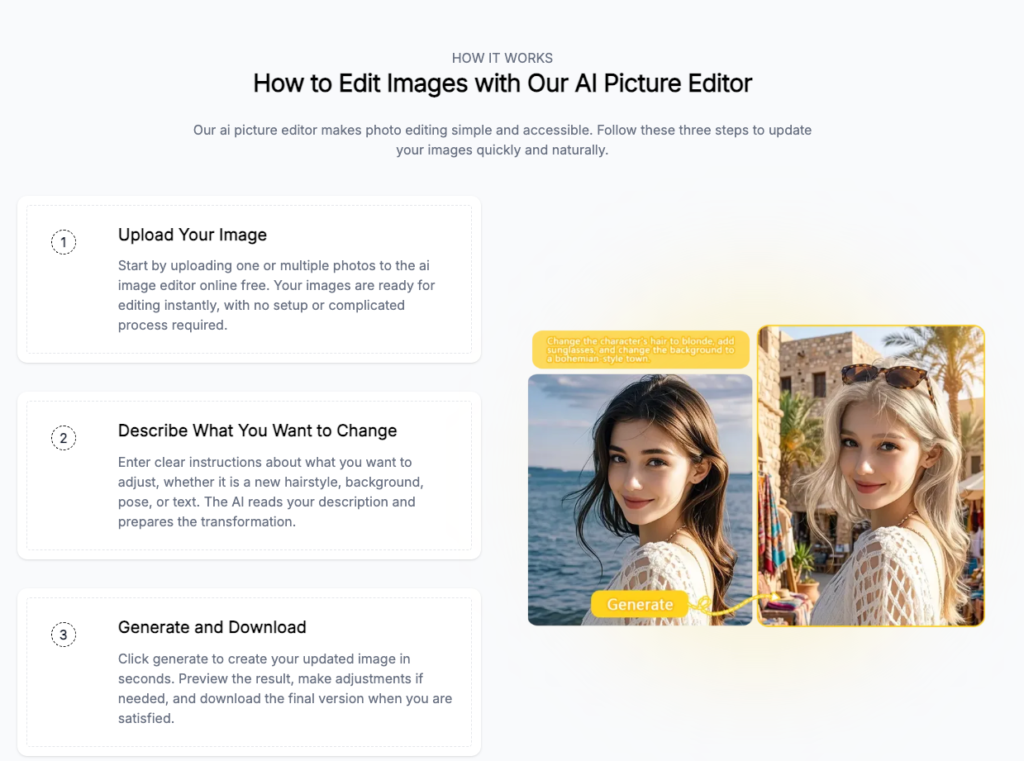
How to use Live3D AI image editor
What Makes Live3D AI Image Editor Different
Unlike traditional tools, Live3D AI Image Editor focuses on simplicity and efficiency. It removes the complexity of manual editing and replaces it with intelligent automation.
Users can achieve results faster without needing advanced skills, making it accessible to a broader audience.
Key Features That Improve Workflow
Live3D AI Image Editor offers a range of features designed to enhance productivity:
- One-click background removal
- Automatic image enhancement
- Fast resizing and format adjustment
- Object removal and cleanup
These features allow users to complete editing tasks quickly and efficiently.
How to Start Using Live3D AI Image Editor
Getting started with Live3D AI Image Editor is simple:
- Upload your image
- Choose the editing feature you need
- Let the AI process the image
- Download the final result
This straightforward workflow makes it easy for anyone to start using the tool immediately.
Why It’s a Better Choice for Most Users
For most users, the combination of speed, simplicity, and quality makes Live3D AI Image Editor a better choice than traditional tools.
It allows users to:
- Save time
- Reduce effort
- Achieve professional results
This makes it ideal for both personal and professional use.
Conclusion: AI Editing Is for Everyone
AI Image Editor tools are transforming how people edit images. By making advanced editing accessible, they remove barriers and open up new possibilities for creativity and productivity.
Live3D AI Image Editor is a great example of this shift. It provides a fast, simple, and effective way to edit images without the complexity of traditional tools.
Whether you are a beginner, a content creator, or a business professional, adopting an AI Image Editor can help you work more efficiently and achieve better results. As AI technology continues to evolve, these tools will become an essential part of everyday digital workflows.