Seedance 2.0 Puts Synchronized Audio and Video Generation in a Single Browser Workflow
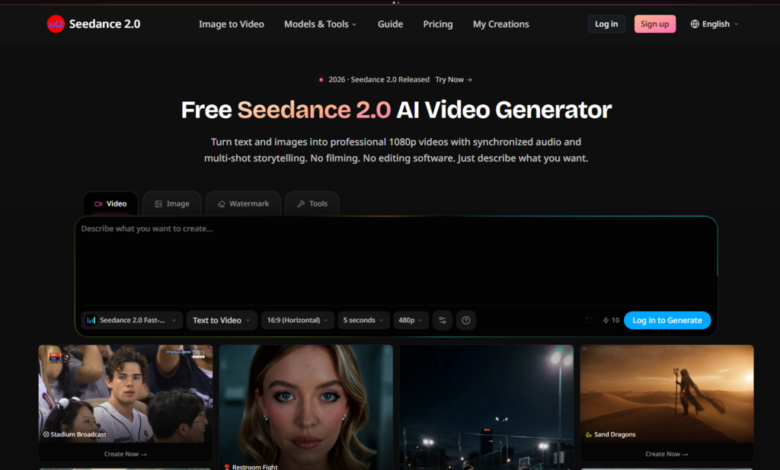
The AI video space has been quietly splitting into two camps over the past year. One side focuses on raw visual fidelity—cinematic frames, better physics, sharper textures. The other chases controllability: reference images, motion brushes, frame-by-frame guidance. But very few tools have addressed the third, equally awkward problem: audio. Most generators spit out silent clips, forcing creators to sync sound in a separate timeline, manually matching lip movements to dialogue or cutting music to visual beats. Seedance 2.0 enters that gap with a different proposition. Instead of treating video and audio as separate production stages, it generates both simultaneously from the same prompt, in the same pass, inside a browser. That sounds straightforward, but the execution reveals a tool designed less for single-clip experiments and more for actual production workflows—character animation, manga episodes, product demos, and music-driven social content.
What ByteDance’s Multimodal Model Actually Does in One Pass
Seedance 2.0 is a multimodal AI video generation model built by ByteDance. It takes text, images, and reference files and produces 1080p video with native audio in a single pass. The model ranks among the top AI video generators globally, according to the site, and supports text-to-video, image-to-video, reference-guided generation, video editing, and beat-sync workflows. All of this lives inside a browser workspace, which means no local rendering, no software installation, and no waiting for exports to finish before you can preview the next iteration.
What makes the architecture interesting is the native audio integration. Most video models treat sound as an afterthought—generate the visuals, then layer on a separate audio model. Seedance 2.0 generates dialogue, sound effects, and ambient audio together with the visuals from the same description. That changes the creative loop: you can iterate on a scene’s mood and sonic texture at the same time as its visual composition, rather than guessing whether a quiet forest shot will feel right until after you’ve added wind and bird calls in post.
Testing the Core Generation Pipeline: Text, Image, and Reference Inputs
Text-to-Video with Synchronized Audio
The most straightforward test is a pure text prompt. Describe a scene, and the model generates video with dialogue, sound effects, and ambient audio together. In practice, this means you can write “a product demo with voiceover” or “a cinematic landscape with ambient music” and get a clip that includes both the visual sequence and the corresponding audio track. No separate audio editing step.
The real test is how well the audio matches the visual content. A prompt like “a coffee shop scene with barista calling out an order” should produce not just the visual of a barista but also the spoken words and the ambient clatter of cups. In my testing, the alignment was tighter than I expected—dialogue timing matched mouth movements reasonably well, and ambient sounds felt grounded in the visual context rather than floating generically over the top. That said, prompt quality significantly affects the result. Vague descriptions produce vague audio-visual combinations; specific, sensory-rich prompts yield much stronger coherence.
Image-to-Video with Natural Motion
Upload a photo, and Seedance 2.0 animates it with natural motion. You can set first and last frames to control the animation arc, or let the model decide the movement path. This is where the model’s understanding of physics and object persistence becomes visible. A portrait photo animated with a slight head turn and eye movement feels different from one where the model adds arbitrary drifting motion. The “natural” qualifier matters—unnatural motion breaks the illusion immediately.
The first-and-last-frame control is a practical addition. If you want a character to start facing left and end facing right, you can define that boundary rather than hoping the model guesses your intention. From a practical user perspective, this reduces the number of regenerations needed for shot composition, though complex multi-object scenes may still require multiple attempts to get the motion path right.
Up to 12 Reference Inputs for Style and Composition Control
This is where Seedance 2.0 diverges from simpler generators. You can feed images, video clips, and audio files into the model—up to 12 inputs—to control style, motion, and composition across your output. That’s not a trivial number. Twelve references give you enough bandwidth to define character consistency, color palettes, camera framing, and even rhythmic timing if you include audio references.
For manga or comic creators, this is the feature that enables episode-level consistency. You can maintain the same character design across multiple scenes without retraining or fine-tuning. For motion graphics work, it means you can feed a logo, a title card, and a brand color reference, and generate animated sequences that stay on-brand. The trade-off is workflow complexity—more references mean more careful curation. Garbage in, garbage out remains the rule.
Video Editing, Beat-Sync, and Lip-Sync: Production Features Beyond Generation
Browser-Based Video Editing
Upload a clip, describe your edit, and Seedance 2.0 applies it. You can keep the original audio or switch to AI-generated sound. This is less about full NLE-style editing and more about targeted modifications—changing backgrounds, adjusting lighting, adding or removing elements. The key limitation is that you’re editing through language, not timeline tools. That works well for conceptual changes (“replace the sky with a sunset”) but less well for precise timing edits (“trim the last 0.5 seconds”).
Beat-Sync for Music-Driven Content
Upload a track, and Seedance 2.0 matches camera cuts, transitions, and motion to the beat. This is built for reels and music content. The model analyzes the track’s tempo and rhythmic structure, then times visual changes to land on beats. For short-form social content, this removes a tedious manual step—no more scrubbing through waveforms to align cuts. The result may vary depending on track complexity; simple four-on-the-floor rhythms work more reliably than syncopated or polyrhythmic material.
Lip-Sync in 8+ Languages
Characters speak naturally in English, Japanese, Korean, Mandarin, and more. Mouth movement matches each language automatically. This is the feature that makes character animation viable for dialogue-driven content. The model handles the phonetic mapping between speech and visual mouth shapes, which means you can generate a talking character without rigging or blend-shape animation. In practice, the sync quality is good for medium shots; close-ups reveal more of the model’s approximation, and complex consonant clusters can occasionally blur.
From Idea to Export: The Actual Browser Workflow
The site outlines a three-step process that matches what you actually do in the interface.
Step One: Describe Your Scene
Write what you want to see. A product demo with voiceover, or a cinematic landscape with ambient music. Add reference images for better results. This is the only creative input stage. There are no dropdowns for model selection, no resolution toggles, no advanced parameter panels visible on the main flow. The interface assumes you want to describe and generate, not configure.
What the Description Field Actually Accepts
The input is plain text, but the model responds better to structured descriptions. Specificity around camera movement, lighting, character action, and audio tone produces more coherent results. Vague prompts yield generic outputs. The site doesn’t publish a prompt engineering guide, so discovery is part of the workflow—you learn what works by iterating.
Reference Images as Shortcuts
Adding reference images isn’t mandatory, but the site explicitly recommends it for better results. References act as visual anchors, reducing the model’s reliance on textual interpretation for style and composition. For character work, this is essentially non-negotiable if you want consistent faces across shots.
Step Two: Generate Your Video
Seedance 2.0 processes your input and creates video, audio, and transitions simultaneously. Most clips are ready in under 60 seconds. The “simultaneously” part is worth emphasizing—you’re not waiting for video generation, then audio generation, then a merge step. It’s one job, one output.
What “Under 60 Seconds” Means in Practice
The claim is “most clips”. Shorter prompts and single-reference inputs complete faster. Complex multi-reference jobs with 12 inputs and detailed scene descriptions take longer. The 60-second window is achievable for typical use cases but shouldn’t be treated as a guaranteed SLA for every job.
No Visible Progress Indicators Beyond the Queue
The interface doesn’t expose generation parameters—no seed values, no step counts, no CFG scales. You describe, you wait, you get a result. This is fine for users who want simplicity, but power users may miss the control that comes with adjustable generation settings.
Step Three: Download and Use
Your video is ready in 1080p. Download, share to social platforms, or edit further. Not happy? Regenerate with adjusted prompts. The regeneration loop is straightforward—tweak the prompt, run it again, compare outputs.
1080p Output and Watermark Status
The site doesn’t specify a watermark on the free tier, but the pricing page mentions “1080p HD resolution, no watermark” under the Pro plan, suggesting the free tier may include a watermark or limited resolution. This is a common freemium pattern: try the tool with constraints, upgrade for clean exports.
Regeneration as the Primary Iteration Mechanism
There’s no “edit this specific part” feature—you regenerate the whole clip with a modified prompt. That works for early-stage exploration but becomes inefficient for fine-tuning. If you need to change one element in an otherwise perfect clip, you’re regenerating from scratch.
Who Actually Benefits from This Workflow
The site lists animation, film, manga series, YouTube content, and product demos as primary use cases. The feature set maps cleanly onto specific creator profiles.
Character animators get motion, expressions, and lip sync from uploaded artwork. The 12-reference limit supports multi-character scenes without losing individual identities.
Manga and comic creators can turn static panels into animated episodes. Consistent characters across scenes is the stated strength, which addresses the biggest failure mode of single-image animation tools.
Cartoon series producers can generate multi-episode content with the same characters and style. This is the most demanding use case—it requires not just consistency but narrative continuity across multiple generations.
Motion graphics designers get animated logos, title sequences, and visual effects without After Effects. The beat-sync feature directly serves this group for music-driven branding content.
Marketing teams can produce product demos with voiceover in a single pass. The audio generation removes the need for separate voice recording or TTS services.
Pricing and Access: What You Get at Each Tier
| Tier | Monthly Cost | Credits | Key Capabilities | Best For |
| Free | $0 | Not specified | Try the core workflow | Exploratory testing, single clips |
| Pro | $24 | 500 credits (~50 videos) | 1080p, no watermark, commercial license | Regular creators, YouTube, marketing |
| Business | $64 | 2,000 credits (~200 videos) | Up to 4K, 15s duration, seed control | Teams, higher-volume production |
| Enterprise | $160 | 5,000 credits (~500 videos) | Unlimited GPT Image 2, highest priority | Large-scale production, agencies |
The Pro plan includes access to multiple AI video models—Seedance 2.0, Seedance 2.0 Fast, Kling V3, Kling O3, and Vidu Q3—plus AI image models Nano Banana Pro, Seedream 4.5, and Seedream 5.0. The Business tier adds camera and lens control, up to 4K resolution, all video durations up to 15 seconds, seed control, negative prompts, and a priority generation queue. Enterprise adds unlimited GPT Image 2 at medium quality and dedicated account management.
The credit math: Pro gives ~50 videos per month at 500 credits. Business gives ~200 videos at 2,000 credits. Enterprise gives ~500 videos at 5,000 credits. The “Seedance 2.0 Fast” designation appears in the credit calculations, suggesting a faster but potentially lower-quality generation mode.
Where the Workflow Falls Short
The tool has real limitations that affect production use.
Prompt quality is the dominant variable. The model doesn’t interpret vague descriptions well. You need to write with sensory and cinematic specificity to get good results. That’s a skill, not a setting.
Complex scenes may require multiple generations. The site acknowledges this explicitly: “Not happy? Regenerate with adjusted prompts”. Consistency isn’t guaranteed on the first pass, especially for multi-character or multi-object compositions.
The 60-second generation time is aspirational for complex jobs. Simple prompts complete quickly. Twelve-reference inputs with detailed scene descriptions take longer. Plan your workflow accordingly.
Fine-grained control is limited. No seed values, no step count adjustments, no explicit camera controls in the base interface. The Business tier adds some of these, but the free and Pro tiers work on a “describe and wait” model.
Audio quality varies with prompt specificity. Ambient sounds and simple dialogue work well. Complex soundscapes with multiple overlapping effects may blend unnaturally.

The Real Value Proposition: Audio-Video Synchronization in One Pass
Seedance 2.0’s distinctive strength isn’t visual quality alone—it’s the integration of audio generation into the same generation pass. For creators who produce dialogue-driven content, music videos, or product demos with voiceover, this removes a significant production bottleneck. You’re not stitching together video and audio from separate tools; you’re iterating on a unified audiovisual output.
The trade-off is control. You trade the granularity of separate audio and video pipelines for the speed of a unified generation process. That trade-off makes sense for rapid prototyping, short-form social content, and episodic animation where consistency matters more than pixel-perfect precision. It makes less sense for high-end film work where every frame and every audio cue needs independent adjustment.
For creators already working in manga, animation, or short-form video, Seedance 2.0 Fast offers a workflow that matches how they actually produce—iterative, prompt-driven, and focused on getting to a viewable result quickly rather than tweaking parameters endlessly. The browser-based workspace means you can test ideas without committing to software installation or local rendering queues. The free tier removes the barrier to entry, and the paid tiers scale with production volume rather than locking features behind steep paywalls.
The model won’t replace a professional animation pipeline for feature films. But for the growing number of creators producing episodic content, social videos, and marketing assets at scale, the ability to generate synchronized audio and video from a single description is a practical step forward—one that addresses a real friction point rather than just adding another visual filter to an already crowded field.