Why Indie Developers Are Replacing Their Sprite Workflow With This AI Tool
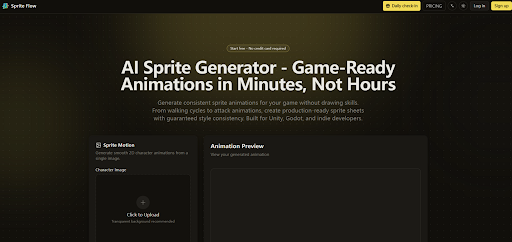
The bottleneck in indie game development has rarely been code. It has almost always been art. For solo developers and small teams, building a full character sprite sheet — walk cycle, idle, attack, death — has traditionally meant either learning pixel art over months, hiring a freelancer at rates that can exceed a thousand dollars per character, or settling for asset packs that everyone else is already using. That calculation is starting to shift. The AI Sprite Generator from Sprite Flow is one of the tools making that shift tangible, and after working through its workflow in detail, it deserves a closer look from anyone building a 2D game on a limited budget or timeline.
The platform positions itself specifically around two problems that generic AI image tools tend to handle poorly: animation consistency across multiple frames, and direct export compatibility with Unity and Godot. Whether it delivers on both is worth examining in actual use rather than marketing copy.
The Core Problem Sprite Flow Is Built To Solve
Most AI image generators are designed for single-image output. Sprite animation requires something fundamentally different — a sequence of frames where the character’s proportions, color palette, and line weight stay visually locked across every frame. Frame 1 and frame 8 of a walk cycle need to read as the same character. That sounds simple in principle but breaks down quickly when prompting tools that weren’t designed with frame-to-frame coherence as a priority.
Sprite Flow’s architecture centers on what it calls style locking. You supply reference images — the platform suggests three to five — and the system extracts the color palette, detail level, and proportional logic from those references, then holds those parameters constant across every generated frame. From a practical standpoint, this means the walking animation you generate in week one and the attack animation you generate in week six should remain visually consistent with the same base style inputs.
In my testing, this consistency mechanism is the platform’s most defensible differentiator. It doesn’t guarantee perfect output on every attempt, and complex character designs with intricate accessories can require multiple regenerations to land cleanly. But the style anchoring works more reliably than prompting general-purpose image models with detailed character descriptions and hoping for coherent results across a sequence.
How The Workflow Actually Runs
Step 1: Upload Your Character Reference
What the upload accepts and why it matters
You start by uploading a character image — the platform recommends a transparent background for cleanest processing — or describe the character in a text prompt. This initial input becomes the style anchor. The more precise and visually clear your reference, the more consistent the output frames tend to be. A well-isolated character on a plain or transparent background gives the system fewer variables to interpret incorrectly.
Step 2: Choose Your Animation Type and Generate
Selecting from available animation categories
From the interface, you select the animation type — walk, idle, run, jump, attack, and several others including combat reactions and advanced movement like dodge rolls and climbing. You also set frame count and animation speed. Once configured, the generation runs and returns the full frame sequence, typically within sixty seconds for standard animation sets. The platform handles the frame-by-frame logic internally; you are not manually directing individual poses.
What the output actually looks like in practice
The result is a preview of the animation playing as a loop, which lets you evaluate consistency and motion quality before downloading. In testing, simpler character designs with clear silhouettes produced more stable results than characters with complex layered details. This is worth setting expectations around — the AI Sprite Generator is strongest when your character design has clear, readable shapes rather than intricate detail that the system has to interpret frame by frame.
Step 3: Export to Your Target Engine
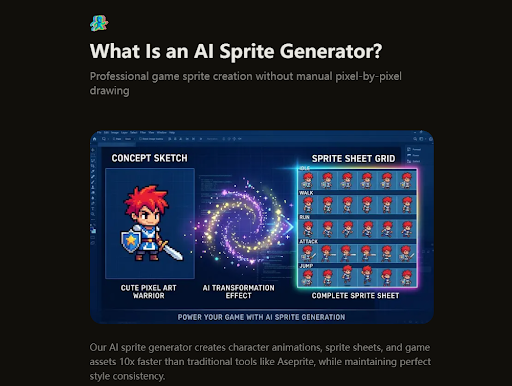
Format options and engine compatibility
The export layer is where Sprite Flow makes a practical argument beyond the generation itself. Output options include APNG, GIF, and ZIP archives of individual frames. For Unity, the export includes the sprite sheet atlas and JSON metadata with frame positions and durations. For Godot, it produces AnimatedSprite-compatible resource files. This removes the manual step of configuring sprite sheets inside your engine, which is a real time cost that many developers underestimate until they’ve done it repeatedly.
Scene-by-Scene Assessment
For Solo Developers With No Art Background
This is Sprite Flow’s clearest use case. If you can describe what you want and supply a reference image, the workflow is accessible without any background in pixel art or animation. The learning curve is low, and the output is directly usable in a game engine without requiring intermediate software. The main limitation here is that the quality of your reference image significantly shapes the output — a rough or ambiguous input produces ambiguous frames.
For Developers Needing Multiple Character Variations
The style locking feature pays off most here. Once your base style is established, generating variations — different equipment tiers, alternate color schemes, NPC versions of the same character class — becomes a much faster process than redrawing animation frames manually. The platform supports this workflow explicitly, and in practice it holds up reasonably well for characters that share a consistent visual language.
For Pixel Art Projects Specifically
The platform supports retro art styles from 8-bit through 32-bit resolution ranges. For developers targeting a specific pixel art aesthetic, the ability to train the style on reference images from a particular era or visual tradition is useful. That said, pixel art has tight tolerances — a single misaligned pixel reads differently than it might in a smoother art style — so expect to evaluate output more critically and potentially regenerate more often for authentic retro results.
Sprite Flow Versus Conventional Approaches
| Factor | Manual Pixel Art | Pre-Made Asset Packs | Sprite Flow |
| Time per character | 20–40 hours | Instant | ~20 minutes |
| Art skill required | High | None | None |
| Style uniqueness | Fully custom | Shared with all buyers | Custom per project |
| Frame consistency | Depends on artist | Fixed | AI-enforced locking |
| Engine export setup | Manual | Varies | Included metadata |
| Cost per character | $500–$5000 | $20–$200 per pack | Low per-credit cost |
| Iteration speed | Slow | None | Fast |
Where The Limitations Are Real
No AI generation tool produces perfect output unconditionally, and it is worth being direct about where Sprite Flow’s results can fall short. Complex character designs with many overlapping elements — layered armor, detailed weapon accessories, intricate facial features — tend to introduce more inconsistency across frames than simpler designs. The system may interpret ambiguous reference inputs in ways that drift from your intent, particularly for characters with unusual proportions or stylized anatomy.
Prompt quality also matters more than the interface implies. Vague or contradictory inputs produce vague outputs, and finding the right description for a character whose visual identity lives mostly in an image rather than words takes iteration. The platform’s sixty-second generation speed makes that iteration manageable, but it is iteration nonetheless, not a single-prompt solution.
Results can also vary between generations using identical inputs. If frame-perfect consistency is critical — for a hero character who appears across hundreds of screens — it is worth planning for multiple generation passes and manual review rather than assuming first-pass output will always land cleanly.
Who Should Actually Be Using This
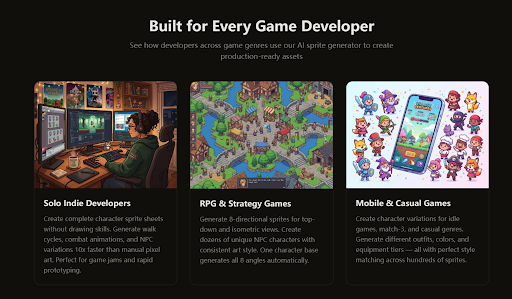
Sprite Flow makes the most sense for developers who need to move quickly through the art production phase without a dedicated artist on the team. Game jam participants, solo developers prototyping new game concepts, and small studios building out NPC rosters or enemy variants will find the speed and style consistency genuinely useful. It is a tool that fits best into workflows where the goal is playable, visually coherent output rather than showcase-quality animation that will be scrutinized frame by frame.
For developers who already have strong pixel art skills or a professional artist collaborator, the value proposition is narrower — though even in those contexts, the rapid prototyping capability has a place in early-stage development before committing to polished hand-drawn assets.
The free tier provides enough credits to evaluate whether the output quality fits your project’s needs before committing to a paid plan. That is the right place to start.