Why SeeVideo Changes Modern Video Creation Habits
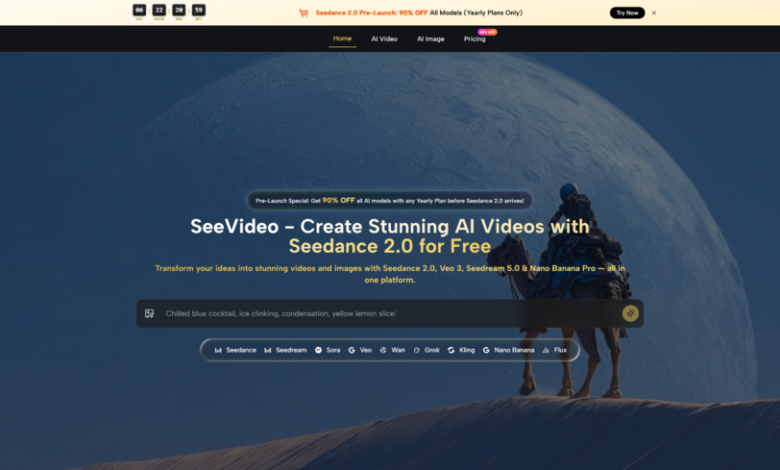
When video has become the default language of attention, many creators discover that the hardest part is not imagination but execution. Ideas arrive quickly, yet production usually slows down at the moment where motion, pacing, and consistency must be built by hand. That is why Seedance 2.0 stands out inside SeeVideo: it reduces the distance between a rough idea and a usable moving result, especially for people who need to test concepts before committing to heavier production.
The interesting part is not simply that the platform can generate clips from prompts. What matters more is the way it reframes creative work. In my observation, SeeVideo is trying to make video generation feel less like operating a single isolated model and more like using a practical workspace where text, images, style direction, and model choice all belong to one connected process. That shift makes the platform easier to understand for marketers, creators, and teams that care about output quality but also need speed.
How SeeVideo Organizes Creative Video Workflows
Seedance 2.0 AI Video presents itself as an all-in-one environment for AI video and image creation rather than a narrow one-model tool. On the video side, its core engine is built around multi-scene generation, while the wider platform also gives users access to other models for different visual goals, such as cinematic storytelling, photorealistic footage, or faster drafting.
This matters because not every project needs the same kind of generation. A short social clip, a product demonstration, and a cinematic concept sequence do not share the same priorities. Some need speed. Some need narrative transitions. Some need realism. SeeVideo’s structure acknowledges that reality instead of pretending one generation path solves everything equally well.

The Platform Starts From Flexible Input Types
According to the official pages, the platform supports text to video and image to video workflows, and its core engine is described as supporting text, image, and audio inputs. That expands the range of starting points. A creator can begin with a written idea, a still image, or an audio-led concept depending on the project.
For everyday users, that flexibility is more important than it sounds. Not everyone thinks in storyboard form. Some people write a scene. Some people start with a key visual. Some people want motion to follow dialogue, music, or sound design. A platform becomes more useful when it accepts the creative material people already have, instead of forcing them into one method.
The Real Value Is Scene Continuity
Many AI video tools are impressive in single moments but weaker when a concept needs transitions or a sequence that feels intentionally connected. SeeVideo emphasizes multi-scene generation as a defining strength of its main video workflow.
In practical terms, this suggests a better fit for work that needs more than a single animated fragment. If a user wants a progression from one visual situation to another, or wants a clip that feels structured rather than accidental, a multi-scene system is easier to take seriously. In my reading of the official positioning, this is one of the main reasons the platform tries to separate itself from simpler video generators.
Why This Workflow Feels More Practical
The appeal of the platform is not just visual quality. It is the combination of quality and decision-making speed. Instead of treating video generation as a one-shot gamble, SeeVideo encourages a more iterative process: describe the idea, select a model, generate, compare, and refine.
Different Models Serve Different Creative Priorities
The official pages explain the role of several models in straightforward terms. The core video engine is framed around multi-scene generation and audio input support. Other options cover needs such as photorealistic output, cinematic narrative quality, artistic styles, and rapid drafts.
That model variety is useful because creators often do not know the right look until they see it. A marketing team may begin wanting something cinematic, then realize a more realistic product-focused style works better. A creator may start with a dramatic concept, then decide that a faster, simpler version is enough for social distribution. The platform seems built for that kind of adjustment.
Reference Guidance Supports Consistency
The official video page also mentions reference images and, for selected models, frame control. That signals a more controlled generation environment than simple prompt-only systems. In my view, this matters most when a project has to stay recognizable across multiple outputs.
Consistency Helps Brand And Character Work
If a campaign needs a stable visual identity, or if a creator wants a recurring character to feel familiar from clip to clip, reference-driven generation becomes far more valuable than raw novelty. AI content often looks impressive in isolation but harder to manage across a series. Tools that support guidance inputs are usually more useful for repeatable work, not just experimentation.
What The Actual User Journey Looks Like
The official flow is simple enough that most users can understand it without technical training. The platform does not appear to rely on a deeply layered production interface. Instead, it keeps the process close to the creative decision itself.
Step One Shapes The Creative Direction
The first step is to begin with either a written prompt or an image. This is where the user defines the basic visual goal, whether that means a scene description, a motion concept, a style direction, or a still image to animate.
Step Two Matches The Right Generation Engine
After that, the user chooses a model. The platform’s own guidance suggests starting with the core engine for most projects, then switching when realism, cinematic structure, artistic style, or faster drafting becomes the higher priority.
Step Three Generates And Compares Results
The next stage is generation itself. The official site describes outputs arriving quickly, often within a short processing window depending on complexity and scene count. That speed makes comparison part of the workflow rather than an afterthought.
Step Four Refines Through Iteration
If the first result is not right, the platform explicitly encourages regeneration. Users can revise prompts, change scenes, add audio input, or switch models. In my opinion, that is a more honest approach than pretending the first output will always be the best one. Good AI workflows usually depend on iteration, and the platform appears to accept that openly.
Where The Platform Fits Best In Practice
A useful way to understand the tool is to ask what kind of work benefits most from its structure. Based on the official examples, it appears especially suited to social media content, marketing and advertising, YouTube production, film support tasks, and e-commerce product visualization.
Fast Content Teams Gain The Most Immediately
Teams that publish frequently often struggle more with turnaround than ideation. For them, a system that combines image creation, video generation, and multiple model options inside one place can reduce friction. Even when the final output still needs human judgment, the speed of reaching a workable draft has real value.
Visual Exploration Becomes Cheaper
The platform also seems useful earlier in the creative cycle. Instead of paying heavily for preproduction before a concept is proven, teams can test tone, pacing, and visual direction faster. That does not replace professional production in every case, but it can narrow uncertainty before bigger commitments are made.
How SeeVideo Compares Creative Priorities
The official descriptions make the platform easier to understand when viewed as a set of tradeoffs rather than a single promise.
| Creative Need | What SeeVideo Highlights | Why It Matters |
| Multi-scene storytelling | Core video engine emphasizes connected scenes and transitions | Better for structured sequences than isolated motion clips |
| Audio-led generation | Audio input support is part of the core workflow | Useful when timing, dialogue, or sound shapes the scene |
| Realistic footage | Other models are positioned for photorealism | Helps when realism matters more than stylization |
| Cinematic narrative tone | Other models are positioned for storytelling depth | Better fit for dramatic concept work |
| Fast drafting | Faster options are available for quick runs | Useful for testing ideas before spending more credits or time |
| Consistency control | Reference images and some frame control are supported | Stronger fit for branded or repeatable content |
The Limits Users Should Understand Early
The platform looks promising, but it is still important to keep expectations grounded. In my experience with tools in this category, strong results usually depend on clear prompting, sensible model choice, and a willingness to rerun generations.
Prompt Quality Still Shapes Output Quality
Even when a model is capable, vague instructions often lead to generic results. The official pages show rich example prompts for a reason. Better prompts usually create better direction, and users who treat prompting casually may not see the full potential of the system.
Not Every Project Needs The Same Model
Because the platform offers several engines, users still need judgment. That is a strength, but it also means there is a learning curve. The fastest option may not be the most cinematic. The most realistic option may not be the most flexible. Good output depends partly on knowing what tradeoff to accept.
Iteration Remains Part Of Serious Use
The site openly notes that users can regenerate if they do not like the result. That is realistic. For serious content work, generation is rarely one-and-done. The practical benefit is not perfect first-pass output every time, but a faster path toward something worth keeping.
Why This Model Of Creation Feels Timely
What makes SeeVideo worth paying attention to is not only its output claims, but the kind of workflow it normalizes. It treats AI creation as a flexible production environment where prompts, images, references, model selection, and revision all belong to one connected loop.
For creators and teams, that may be the larger shift. The future of video generation probably will not belong to tools that only produce striking fragments. It will belong to systems that help people make decisions faster while keeping enough control to shape repeatable work. In that sense, SeeVideo feels less like a novelty generator and more like an early version of a practical creative operating layer.