How to Fix Amazon Prime No Sound Issue?
Are you streaming your favorite show on Amazon Prime? Does the audio suddenly stop working? This problem frustrates many users. Don’t worry. We have solutions for you.
This guide will help you fix the no sound issue. You will learn why it happens. You will also discover easy fixes. Let’s get started.
Part 1: Breaking Down the Amazon Prime No Audio Issue
The Amazon Prime no sound problem appears in different ways. Understanding your specific issue helps find the right solution. Here are three common situations:
1. No Audio at All
You see the video playing on screen. The picture looks clear. But you hear nothing at all. This is the most common sound issue. It affects many Prime Video users.
2. Audio but No Voices
Background music plays normally. Sound effects work fine. But you cannot hear any dialogue. The actors’ voices are completely missing. This issue relates to audio channel settings.
3. No Video, Only Sound
The screen stays black or frozen. But the audio keeps playing. You can hear everything perfectly. This problem affects your viewing experience differently.
Part 2: Why Causes No Sound Issue on My Amazon Prime?
Several factors cause Prime Video sound not working. Let’s explore the main reasons:
Device Volume Settings: Your device volume might be muted. The volume level could be too low. This simple issue happens more often than you think.
App Glitches: Temporary bugs affect the Prime Video app. These glitches disrupt normal audio playback. Regular updates sometimes introduce new issues.
Browser Problems: Outdated browsers cause compatibility issues. Cache files interfere with streaming. Cookies sometimes block proper audio output.
Internet Connection: Slow internet affects audio streaming. Unstable connections interrupt sound delivery. Poor bandwidth creates playback problems.
Audio Output Device: Wrong audio output selection causes silence. Bluetooth devices disconnect unexpectedly. External speakers may have connection issues.
System Updates: Operating system updates change settings. New updates sometimes conflict with apps. This affects Amazon Prime audio not working.
HDMI Connection: Faulty HDMI cables block sound transmission. Loose connections interrupt audio signals. Wrong HDMI ports cause output problems.
Part 3: 6 Ways to Fix Amazon Prime No Sound Issue
Try these proven solutions step by step. Most users find success with these methods.
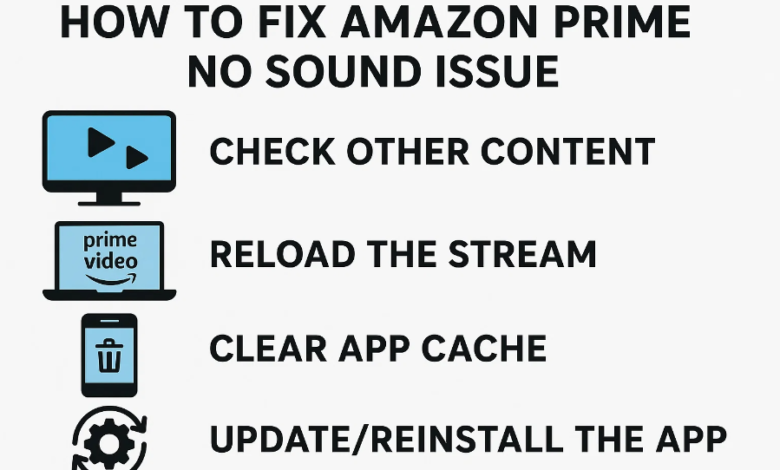
Solution 1: Check Volume and Mute Settings
Start with the basics first. Check your device volume level. Make sure mute is turned off. Increase the volume to maximum. Test the sound again.
Check the Prime Video app volume. Look for the volume icon on the player. Slide it to the right. Verify your system volume mixer settings.
Solution 2: Restart Your Device
A simple restart fixes many problems. Close the Prime Video app completely. Turn off your device. Wait for thirty seconds. Turn it back on. Open Prime Video again.
This clears temporary glitches. It refreshes system processes. Many users report this solves their issue.
Solution 3: Update the Prime Video App
Outdated apps cause various problems. Open your app store. Search for Prime Video. Check for available updates. Install the latest version.
Updates include bug fixes. They improve compatibility. They enhance overall performance. Always keep your apps updated.
Solution 4: Clear Browser Cache and Cookies
Browser data accumulates over time. This affects streaming performance. Go to your browser settings. Find privacy or history options. Clear cache and cookies. Restart your browser.
Try streaming again. This solution works well for web users. It resolves many playback issues.
Solution 5: Check Audio Output Device
Verify your selected audio output. Open system sound settings. Check which device is active. Switch to the correct output. Test different options if needed.
Disconnect any Bluetooth devices temporarily. Try using built-in speakers first. Reconnect external audio devices properly. Make sure all cables are secure.
Solution 6: Reinstall the Prime Video App
Uninstall Prime Video from your device. Download it fresh from the store. Install the latest version. Sign in to your account. Test the audio playback.
A clean installation removes corrupted files. It resets all app settings. This often resolves persistent problems.
Part 4: Ultimate Solution to Fix Amazon Prime No Sound Issue
Sometimes standard fixes don’t work. You need a reliable alternative solution. CleverGet Amazon Downloader offers a permanent fix.
This powerful tool downloads Prime Video content. You save videos with perfect audio. Watch them offline without streaming issues. The sound always works perfectly.
CleverGet downloads videos in high quality. It preserves original audio tracks. You choose your preferred format. The interface is simple to use.
Alternatively, try CleverGet Recorder for free. It records your screen and audio. You capture content while it plays. Save it for later viewing.
Both tools eliminate streaming problems completely. You control your viewing experience. No more frustrating audio issues.
Part 5: FAQs
1. Why is there no sound on my Amazon Prime Video?
Multiple reasons cause this problem. Check your device volume first. Verify your internet connection speed. Update the Prime Video app. Clear browser data if streaming online. Check your audio output settings.
2. Why does Amazon Prime Video have no sound on my Smart TV?
Smart TV audio issues need special attention. Check TV volume and mute status. Verify HDMI cable connections. Update your TV software. Reset the Prime Video app. Check TV audio output settings.
3. Does Amazon Prime support surround sound and Dolby Atmos?
Yes, Prime Video supports advanced audio. Many titles include Dolby Atmos support. Surround sound is available on compatible devices. Check individual title details for audio options. Your device must support these formats.
4. Why is there no sound only on Amazon Prime, but other apps work fine?
This suggests an app-specific issue. Reinstall the Prime Video app. Check app permissions in settings. Update to the latest version. Clear app cache and data. Contact Prime Video support if needed.
5. What should I do if I still can’t fix the no sound issue?
Contact Amazon customer support directly. They provide specialized technical help. Meanwhile, use CleverGet Amazon Downloader as a backup solution. Download your content with guaranteed audio. Or record it free with CleverGet Recorder.
Conclusion
The Amazon Prime no sound issue frustrates viewers. But solutions exist for every situation. Start with simple fixes like volume checks. Try restarting your device next. Update apps and clear cache files.
Check your audio output devices carefully. Reinstall the app if problems persist. For a permanent solution, consider CleverGet tools. They ensure uninterrupted viewing pleasure.
Most users fix their sound problems quickly. Follow our step-by-step guide carefully. Try each solution in order. Your audio will work again soon.
Enjoy your Prime Video content hassle-free. Stream your favorite shows and movies. Never let audio issues interrupt your entertainment again.