How to Unblur an Image and Restore Clarity
Have you ever taken a photo only to realize it turned out blurry? Blurred images can happen for many reasons, from shaky hands to poor lighting. While this can be frustrating, the good news is that there are ways to fix it.
Clear images make a strong impression and are often necessary for personal, creative, or professional projects. Learning how to restore clarity can save valuable memories and enhance digital work. Fortunately, tools and methods exist to bring details back.
This guide will explore practical ways to sharpen and unblur photos effectively. Read on!
Understanding Why Images Become Blurry
Motion, like when the camera or the subject moves during the shot, can make the picture blurry. One more reason is that the focus is off, especially if the camera locks onto the wrong point.
Low light can make it hard for the camera to work, which can lead to fuzzy pictures. Details can also be lost when you use digital zoom or a bad lens. To find the right solution, it helps to know what caused the problem.
For example, fixing a motion blur problem is different from fixing a simple focus problem. Finding the source saves you time when you need to make changes. This is the first step in getting clarity back.
Using Built-In Editing Tools on Your Device
Picture-editing apps are already on most computers and smartphones. Most of the time, these apps have sharpening tools that can get rid of blur. Usually, the changes are easy, with sliders that control the level of intensity.
It’s best to be gentle when sharpening, since too much force can make the edges look rough. A lot of devices also let you change the brightness and contrast, which can make things even clearer.
When you combine these changes, the result looks better. The process is quick and doesn’t require any special tools. This means that built-in apps are a good place to start.
Trying Online Tools for Quick Fixes
There are free and simple ways to fix blurry pictures online. A lot of these sites only need you to upload something to start editing. Most of the time, they have automatic sharpening algorithms that make changes to the photo right away.
Some services also let you control things more manually with sliders. The results are different on each platform, but they can help you make quick changes.
They also take up less space because you don’t have to download any software. This makes them perfect for people who only need to fix things quickly once in a while. For easy projects or small changes, online editors are great.
Exploring Professional Software Options
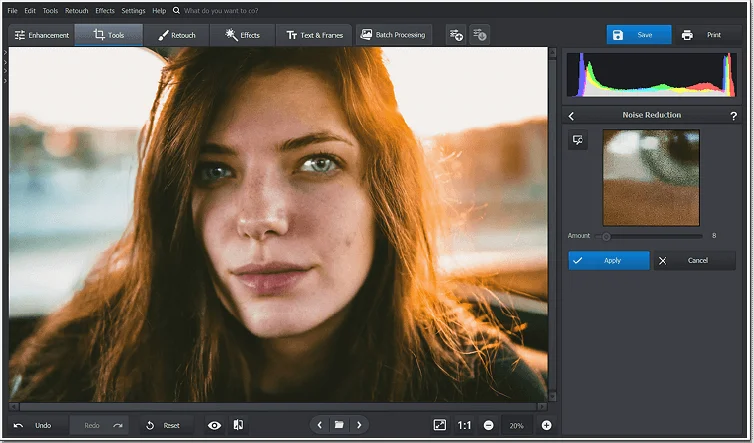
You can get more control with professional software like Adobe Photoshop. These programs have sharpening filters that can be used on certain areas. Noise reduction tools help even out the grain that comes from sharpening too much.
There are a lot of tutorials online, even if they look hard to understand. These tools are used by professionals to do high-quality work in fields like design and marketing. They also let you edit multiple photos at once, which saves time.
As long as you use layers in this kind of software, changes will not be lost. If you wait, you might get almost perfect results.
Using AI-Powered Photo Enhancement Tools
AI-powered editors are becoming popular because they are fast and effective. These tools analyze an image and predict missing details to restore sharpness.
Many AI apps can correct motion blur, low resolution, and poor lighting all at once. Some tools even allow you to choose the level of enhancement for a natural look. They are especially useful for people with little editing experience.
AI also continues to improve, offering better results over time. The unblur image option from Adobe Express is an example of this technology. With AI tools, users can turn blurry photos into clearer, more professional results.
Restoring Old Photos with Special Techniques
Many printed photos lose their quality over time. Using editing software, you can fix them up after scanning them digitally. Worn edges can look sharper and less faded with certain filters.
With digital tools, you can also get rid of dust and scratches. A few AI platforms are especially good at fixing up old photos. All of these tools can fix pictures that are blurry or have incorrect colors.
Updating and preserving family photos is an important part of passing on history and memories. With digital photos, you can bring old pictures back to life.
Adjusting Image Resolution for Better Quality
Resolution plays a key role in image clarity. Low-resolution pictures appear soft and blurry when enlarged. Upscaling tools can increase resolution while adding details.
Many AI programs now specialize in intelligent upscaling. Adjusting resolution before sharpening often leads to better results. It ensures the image has enough detail to work with.
For best outcomes, always save edits in the highest quality format. A higher resolution makes images suitable for prints, presentations, or professional use.
Using Mobile Apps for On-the-Go Fixes
Photo editing apps for smartphones offer convenience. They are simple to use and include basic sharpening features. Some apps also have filters that enhance contrast and detail.
Mobile apps allow quick corrections before sharing photos online. Many of them are free or affordable with premium features. They are perfect for fixing selfies, social media posts, or travel photos.
Adjustments can be made within minutes without technical skills. Mobile tools make it easy to maintain clarity anywhere and anytime.
Best Practices to Avoid Future Blurriness
Preventing blur is often easier than fixing it. Holding the camera steady is the first step. Using tripods or stabilizers provides even better results.
Proper lighting also reduces the chance of unclear images. Avoid digital zoom, as it lowers quality. Learn to focus properly before pressing the shutter. Many modern cameras include image stabilization features.
Regularly cleaning the lens prevents dirt from causing blur. By following these practices, images stay sharp and require fewer corrections.
Easy Ways To Remove Image Blurring
Photo blurs don’t have to stay blurry forever. Details can be sharpened and overall quality can be raised with the right tools. Fast solutions include simple apps for devices, online editors, and tools powered by AI.
Customers who need to be very precise can get more control with professional software. You can also get long-lasting value from restoring old or low-resolution photos.
As important as shooting steadily and with good focus is preventing problems. Crystal clear pictures leave lasting impressions and help memories last longer.
Did you like this guide? Great! Please browse our website for more!