Seedance 2.5 Generates a Complete 30-Second Advert in 4K From a Single Description — No Filming, No Editing, No Post-Production
If you run a small business, manage social media accounts, or create content for a living, you have almost certainly had this experience: you need a short video — a product demo, a promotional clip, a social media advert — and the gap between what you can imagine and what you can actually produce is measured in hundreds of pounds and several days of turnaround.
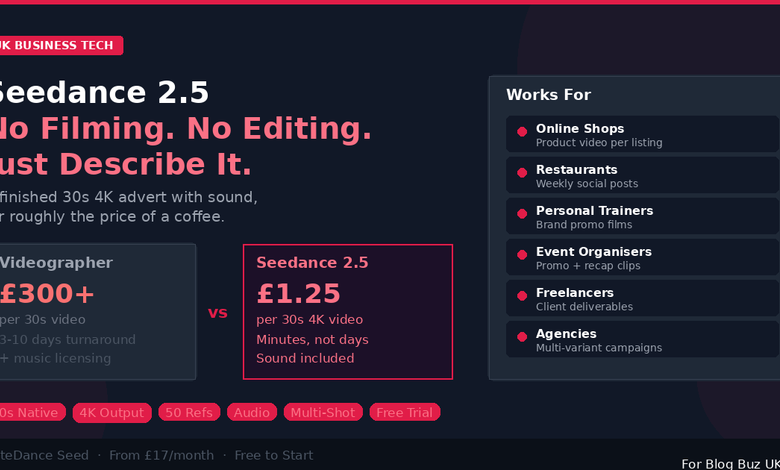
Hiring a videographer for a 30-second clip starts at £300 and can easily reach four figures once you factor in editing, music licensing, and revisions. Template-based tools like Canva give you basic motion graphics but not genuine video content. Previous AI video generators produced clips of 8 to 15 seconds with no sound and inconsistent visual quality. None of these options delivered a finished, publishable video from a simple description.
ByteDance’s Seedance 2.5, launched on 31 July 2026, changes what is practically possible. The model generates up to 30 seconds of native 4K video with synchronised stereo audio — music, sound effects, ambient noise — from a single text prompt. You can supply up to 50 reference files (product photos, brand images, camera movement examples, audio mood samples), and the model uses all of them to produce output that looks and sounds like professionally produced content.
For a detailed walkthrough of the model’s capabilities and generation modes, Seedance 2.5 provides interactive demos and step-by-step guides.
What You Can Actually Make With It
The technical specifications are impressive on paper, but what matters is what they mean in practice. Here are the most common use cases, described in terms of what a real user would create:
Product Videos for Online Shops
You sell handmade candles through your Shopify store. You have six product photos taken on your phone. You upload them as references and write: “Create a 30-second product showcase video. Show each candle from @image1 through @image6 in a warm living room setting with soft evening lighting. Slow camera orbit around each candle. Gentle acoustic guitar in the background.”
The model generates a 30-second 4K video showing your actual candles (matched from your photos) in a cosy living room, with smooth camera movement and appropriate background music. No photographer, no studio hire, no music licence, no editing.
For an online shop with 20 or 50 products, this capability transforms what is economically feasible. Instead of one hero video for your homepage, you can have a product video for every listing.
Social Media Adverts
You manage the Instagram and TikTok accounts for a local restaurant. You need three posts per week — each with a video that fits the platform’s format and captures attention in the first second. You upload photos of the dishes, a short clip of the kitchen that shows the energy you want to convey, and a music sample that matches the brand’s vibe.
Write a prompt for each post: “Scene 1: Close-up of the pasta dish from @image1, steam rising, rack focus. Cut. Scene 2: Wide shot of the restaurant interior, warm candlelight. Cut. Scene 3: The chef plating the dish, movement style from @video1. Text overlay: ‘Book your table — link in bio.’ Music mood from @audio1.”
The multi-shot mode generates all three scenes as one continuous 30-second clip with clean transitions and consistent colour grading. Generate the TikTok version in 9:16 and the Instagram post version in 1:1 from the same prompt by changing the aspect ratio.
Brand Promotional Content
You run a personal training business and need a promotional video for your website. You have photos of yourself working with clients, a clip of the camera style you like from a fitness YouTube channel, and a driving motivational track that fits your brand. Upload everything, describe the sequence, and generate a 30-second brand film that would otherwise require a half-day shoot and a week of editing.
Event Promotion and Recap
You organise a monthly networking event. You need a promotional video for the next one and a recap video from the last one. Upload photos from previous events as references, describe the atmosphere and energy you want to convey, and generate both clips in minutes. The recap video uses actual photos from the event; the promo video uses those same photos as style references for generated content that previews the next event.
How the Reference System Keeps Your Brand Consistent
The single most important feature for business users is the reference system. You supply your own images, video clips, and audio files — up to 50 in total — and tag each one in your prompt with an @ mention. You describe in plain English what role each reference plays.
This is not vague “style transfer” where the output approximates your brand. The model preserves specific visual elements from your references: your product’s actual appearance, your brand colours, your preferred camera movement, your chosen audio mood. When you generate multiple videos over time using the same set of references, the output maintains visual consistency — the same brand identity across every piece of content.
For businesses that have invested in building a recognisable visual brand, this consistency is worth more than any individual clip. A social media feed where every video shares the same colour palette, the same energy, and the same production quality builds credibility in a way that a mishmash of different styles cannot.
Multi-Shot Mode: A Complete Advert, Not Just a Clip
Previous AI video generators produced a single continuous shot — one camera angle, one scene, one moment. If you wanted a multi-scene advert (close-up, wide shot, detail shot, call-to-action), you generated each shot separately and edited them together. The visual consistency between shots was unreliable.
Seedance 2.5’s multi-shot mode lets you describe an entire sequence in one prompt. Multiple scenes, camera transitions, and narrative beats — all generated as part of a single 30-second clip. The model handles the cuts, maintains visual continuity across scenes, and preserves character and product identity throughout.
This is the difference between producing raw footage that needs editing and producing a finished advert that is ready to upload. For a small business owner who does not have editing software or editing skills, this difference is everything.
Native Audio: No More Searching for Royalty-Free Music
Every creator knows the drill: you generate or film a video, then you spend 30 minutes searching royalty-free music libraries for a track that fits, checking the licence terms, downloading it, syncing it to the video, adjusting the volume, and exporting. The audio step takes longer than the video step for many creators.
Seedance 2.5 generates stereo audio — music, sound effects, and ambient noise — in the same rendering pass as the video. The audio is synchronised with the visual content at the model level. You can also supply an audio reference file to set the mood: upload a sample of the kind of music you want, and the model generates visuals whose pacing and energy match.
The practical benefit is straightforward: every clip comes out with appropriate sound, ready to publish, without a separate audio production step.
Region Editing: Fix One Part Without Starting Over
You generate a 30-second product video. The first 20 seconds are exactly right, but the final scene has the wrong background. With every other AI video tool, your only option is to regenerate the entire 30-second clip and hope the good parts survive. They usually do not.
Seedance 2.5 supports timestamp-precise region editing. You specify which segment to change and what to change about it: “Between 0:20 and 0:28, replace the background with a white studio setting. Keep everything else.” The model makes exactly that change while preserving the rest of the clip frame-for-frame.
For business users who need their output to match specific brand standards, this iterative refinement capability saves significant time and credits. You do not waste resources on full regenerations when only one part needs adjustment.
How It Compares to Other Options
| Option | Cost per 30s video | Turnaround | Quality | Sound included | Brand control |
|---|---|---|---|---|---|
| Freelance videographer | £300–£1,500+ | 3–10 days | Professional | Extra cost | Full (you direct) |
| Canva / template tools | £10–£30/month | Minutes | Template-level | Stock music | Limited to templates |
| Previous AI generators | £5–£20/clip | Minutes | Variable, 8–15s max | No | Minimal |
| Seedance 2.5 | ~£1.20/clip | Minutes | 4K, 30s | Yes, native | 50 references |
The comparison that matters most for small businesses: a freelance videographer produces the highest quality but at a cost that limits how many videos you can produce. Seedance 2.5 produces professional-quality output at a cost that makes volume production practical — every product gets a video, every week gets fresh social content, every campaign gets multiple variants.
Pricing Breakdown
Seedance 2.5 offers a free tier — 16 credits upon registration, no payment card required. This is enough for two or three test videos to evaluate whether the tool fits your workflow.
Paid plans use a monthly credit system:
Starter — $21/month (approximately £17/month, billed annually). 180 credits per month, roughly 11 videos. HD resolution, watermark-free output. One concurrent generation task.
Standard — $56/month (approximately £45/month, billed annually). 580 credits, roughly 36 videos. 4K resolution, higher generation quality, private generations, four concurrent tasks. This is the sweet spot for a small business producing regular social media content.
Premium — $90/month (approximately £72/month, billed annually). 1,300 credits, roughly 81 videos. Pro models, maximum quality, eight concurrent tasks, priority queue, batch processing, early access to new features. Designed for agencies and high-volume content operations.
All paid plans include commercial licensing — every video you generate is cleared for use in adverts, social media, websites, and any other commercial context. Complete plan details at the Seedance 2.5 pricing page.
At Standard plan pricing, the cost per 30-second 4K video with sound works out to roughly £1.25. Compare that to even the most budget-friendly freelance videography, and the economics are clear.
How It Compares to Competing AI Video Models
For readers who are evaluating multiple AI video tools, here is how Seedance 2.5 stacks up against the major competitors:
| Feature | Seedance 2.5 | Sora 2 (OpenAI) | Veo 3.1 (Google) | Kling 3.0 | MiniMax H3 |
|---|---|---|---|---|---|
| Max clip length | 30 seconds | 25 seconds | 8 seconds | 10 seconds | 15 seconds |
| Resolution | 4K native | 1080p | 4K | 1080p | 2K |
| Reference inputs | Up to 50 | 1–2 | 1 | 3–5 | Up to 12 |
| Native audio | Yes (input + output) | Output only | Output only | No | Yes (input + output) |
| Multi-shot | Yes | No | No | No | No |
| Region editing | Yes | No | Limited | No | No |
| Free tier | 16 credits | No | Limited | Limited | Limited |
Seedance 2.5 leads on clip duration, reference count, and feature completeness. Veo 3.1 produces the most visually polished individual frames but is limited to 8-second clips. MiniMax H3 offers open model weights and competitive pricing but caps at 15 seconds and 12 references.
Limitations Worth Knowing
Seedance 2.5 is powerful but not unlimited. The 30-second maximum means longer videos still require multiple generations edited together. A beta long-video mode extends to 180 seconds but with reduced quality. The model is closed-source — unlike some competitors, you cannot download it and run it on your own hardware. And the prompting community is young; getting optimal results requires experimentation with prompt structure and reference selection.
On absolute per-frame visual quality, Google’s Veo 3.1 remains the leader. If your brief calls for the single most cinematically polished 8-second clip possible, Veo 3.1 has the edge. For everything else — longer clips, multi-shot storytelling, sound, brand control, cost efficiency — Seedance 2.5 has the advantage.
Who Made It
Seedance 2.5 was developed by ByteDance’s Seed team — the same company behind TikTok. The model was announced at the Volcano Engine FORCE Conference in Beijing on 23 June 2026 and officially launched on 31 July 2026. It is the third generation of ByteDance’s video model line, following Seedance 1.0 and Seedance 2.0.
Getting Started
The quickest way to try Seedance 2.5 is through its web interface. Register for 16 free credits without entering payment details. Upload some product photos or brand images, write a description of the video you want, and generate. Within minutes you will have a 30-second 4K clip with sound that you can evaluate against your actual content needs.
For developers and technical teams, API access is available through ByteDance’s Volcano Engine platform, supporting text-to-video, image-to-video, and multi-reference generation.
For UK businesses, freelancers, and content creators who have been producing video content the hard way — or avoiding it entirely because of the cost — Seedance 2.5 makes professional-quality video production accessible at a price point that changes the calculus. A finished 30-second 4K advert with sound, generated from your own brand assets, for roughly the price of a coffee. That is worth testing.