Rugged Phone: How to Make Better Use of It
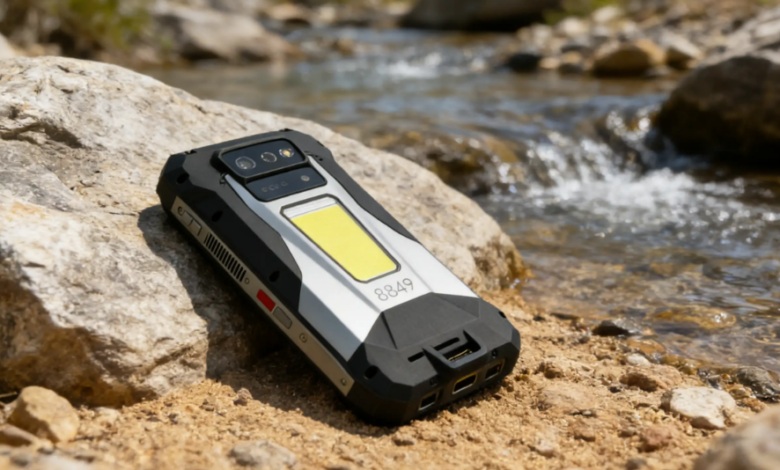
A Rugged Phone is made for rough places like dusty job sites, wet weather, cold mornings, and long shifts. Many people still use rugged phones like standard phones, so they miss the best benefits. A few setup choices and daily habits can make the device faster, safer, and more reliable.
Let’s talk about the practical use: shortcuts that work with gloves, battery habits that last all day, settings that help in weak coverage, and care steps that protect ports and seals.
What makes a phone truly rugged in real-world conditions?
A rugged phone is designed to survive drops, dust, and water exposure better than a regular phone. That matters because most damage comes from repeated stress, not one big event. Small falls onto concrete, fine grit in a pocket, and water around ports can slowly wear a device down.
Rugged Build
Rugged builds usually add thicker frames, reinforced corners, and tighter sealing. Those parts reduce damage from bumps and short drops. They also help when the phone is handled with dirty gloves, used in rain, or set down on rough surfaces many times per day.
Real Limits
“Rugged” does not mean “unbreakable.” Seals can wear over time, and a sharp impact can still crack a screen. Protection is highest when the phone is in good condition and used within its tested limits.
How do you set up a Rugged Phone for faster daily tasks?
A smart setup puts the tools you use most on the lock screen, a programmable button, and the home screen. This is where rugged phones feel different from regular phones, because field use often means one hand, gloves, noise, and bright sun.
Lock Shortcuts
Lock-screen shortcuts save time when speed matters. Set one shortcut for the camera and one for a light or calling tool. Add emergency contacts and medical information if the phone supports it. Keep the lock screen clean so taps are easy and mistakes are rare.
Side Button
A programmable side key is one of the most underrated rugged features. Assign it to your most repeated action, such as flashlight, camera, voice recorder, or push-to-talk. Test the shortcut while wearing the gloves you actually use, not the gloves you keep in a truck.
A Rugged Phone becomes more useful when one button launches the camera or flashlight without hunting through menus.
App Layout
Place work apps where your thumb can reach them. Keep the home screen simple and avoid extra pages. Increase the text size if you need fast glances more than long reading. Turn on vibration or clear tones for the alerts that matter most, especially if you work in loud areas.
What do IP ratings and MIL testing mean for safe everyday use?
IP and MIL labels show what the device was tested against. They help you decide what is safe, what is risky, and what needs extra care. These labels are useful, but only when you understand the basics.
IP Ratings
IP ratings describe protection against dust and water. IP68 often suggests strong dust protection and water resistance under controlled test conditions. IP69K is often used for high-pressure, hot spray tests in a defined setup. These are test conditions, not a promise that any water situation is safe. Soap, salt water, impacts, and worn seals can change real outcomes.
MIL Testing
MIL‑STD‑810H is a set of test methods for environmental stress, such as drops, vibration, and temperature changes. A phone may pass certain tests and still fail in an untested situation. Treat the label as a clue about design goals, not a guarantee.
Drop Limits
Small drops can break screens if the phone lands on an edge, metal corner, or sharp rock. A screen protector can help when your daily work includes repeated falls onto hard surfaces.
How do you extend battery life on long shifts and travel days?
Battery lasts longer when screen use is controlled, background drain is reduced, and charging is planned around your day. Many rugged phones have large batteries, but field conditions can drain them fast.
Screen Power
The screen is often the biggest power drain. Set a reasonable brightness level and avoid max brightness unless you need it. Reduce screen timeout so the phone is not glowing in a pocket. Turn off “always-on” display features if you do not need them.
Signal Drain
Weak coverage makes phones hunt for signal, and that burns battery. Airplane mode saves power in known dead zones. Stable settings can also help in borderline areas where the phone keeps switching networks.
Charging Rhythm
Fast charging helps, but consistency matters more. Keep one reliable cable where you always carry it. Use short charge breaks on purpose. Replace frayed cables early, because bad cables can cause heat and slow charging.
Which rugged phone features improve speed and safety in the field?
The most helpful features are the ones that save steps, improve control with gloves, and add safety options in bad conditions. Many rugged features feel small until you need them.
Programmable Keys
A side key can reduce time and risk. Map it to a tool you use while moving, like a flashlight, camera, or voice note. A one-press action is faster than unlocking, searching, and tapping.
PTT Calls
Push-to-talk can help teams communicate quickly, especially in noise. Set the shortcut , so it works with gloves and does not require multiple taps.
Glove Mode
Glove mode can fix missed taps and slow typing. It often increases sensitivity. Wet-touch features can also help in rain. Test these settings in your real conditions, because higher sensitivity can also lead to accidental touches.
Safety Alerts
SOS settings, emergency contacts, and location sharing can help in remote work. Set these up once and keep them current. A rugged phone is often present when other tools are not, so it makes sense to configure safety features early.
Who gets the most value from rugged phones in daily life?
Rugged phones offer the most value when a normal phone would get damaged often or fail during long days away from charging. The best setup depends on where and how the phone is used.
- Field Crews : Field crews need fast photos, clear notes, reliable calling, and strong battery life. Camera shortcuts and voice notes can save minutes per job, which adds up across a week.
- Outdoor Users: Outdoor users benefit from offline maps, better grip, and cold-weather handling. Battery planning and safe carry matter more than extra apps. A bright display and glove-friendly settings can also reduce frustration.
- Fleet Teams: Teams managing many devices benefit from consistent setups. Fewer custom settings mean fewer support issues and fewer mistakes. A simple standard makes training easier and reduces downtime.
Conclusion
Better rugged phone use comes from setup, smart limits, and small routines. Shortcuts and side-key actions reduce wasted time. IP and MIL labels help you match risks to real protection. Port care, safe cleaning, and consistent carry habits prevent many failures that show up later. Battery and offline planning keep the phone ready during long shifts and weak coverage.
A Rugged Phone works best when it is treated like a daily tool: quick to access, easy to operate, and protected at the weak points. A simple checklist and a repeatable setup process can make the same device feel more dependable for every person who uses it.