Sports Camera for Football and Rugby: Filming Matches from the Sideline
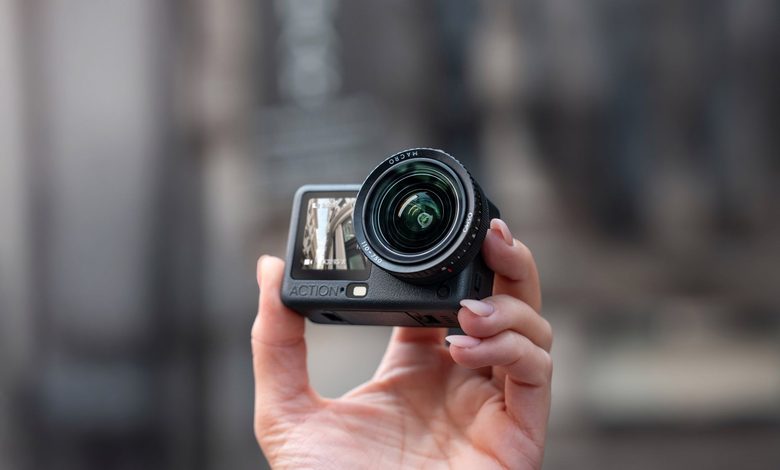
Filming football or rugby from the sideline sounds simple: place a camera near the pitch, press record and let the match unfold. In practice, getting useful footage requires more thought. Players move quickly, the action can switch from one end of the field to the other in seconds, and a wide-angle camera sees the game very differently from a telephoto lens.
A compact sports camera works best when it is used for what it does particularly well: getting close to the atmosphere, recording movement smoothly and capturing angles that would be awkward with a larger camera. The key is choosing the right position and settings before kick-off.
Decide what kind of footage you actually want
A small action-style camera is not the ideal tool for filming every player clearly from the opposite side of a full-size football pitch.
Its wide field of view is much better suited to closer action. From the touchline, it can capture tackles, throw-ins, substitutions, celebrations, warm-ups and players running past the camera. It can also work as a fixed secondary angle while another camera covers the wider match.
That distinction matters because it changes where the camera should be placed.
If the goal is tactical analysis of the entire pitch, a higher and more central position with a narrower field of view is normally more useful. If the goal is energetic match footage for social media, club content or a highlight video, a low sideline camera can create a much stronger sense of speed.
Do not simply point the camera at the halfway line
Position affects the result more than many camera settings.
For football, a location near the attacking third can capture runs towards goal, corners and celebrations. A position closer to halfway provides more general movement but makes goalmouth action appear smaller.
Rugby can be even more challenging because phases of play may move rapidly along the touchline before switching direction. A camera placed too close to one end may spend much of the match watching distant action.
A compact sports camera is therefore particularly useful when it can be repositioned quickly or used as an additional angle. A small tripod, secure clamp or suitable mount can create a low-profile setup without requiring a large video rig beside the pitch.
Permission still matters. Clubs, venues, leagues and tournament organisers may have their own rules on filming, camera positions and commercial use. Any tripod or mount should also remain outside playing areas, technical zones and routes used by players or officials.
Wide angle is useful, but distance still matters
Wide-angle cameras make fast movement easier to keep inside the frame, which is one reason they work so well for sport.
The trade-off is that distant players appear small.
The best sideline footage therefore tends to come from moments when the action approaches the camera. Rather than expecting every minute of a match to look dramatic, think of the sports camera as a tool for collecting specific types of shots.
Warm-ups are particularly useful because players often pass close to the touchline. The same applies to substitutions, set pieces, celebrations and team reactions.
For a finished highlight video, these close shots can then be mixed with wider match footage to make the edit feel much more dynamic.
Use 4K/60fps as a practical starting point
For most football and rugby footage, 4K at 50 or 60 frames per second is a useful balance.
The higher frame rate captures fast movement more cleanly than 25 or 30fps and gives some flexibility to slow a moment down during editing. At the same time, it is less demanding on storage and battery than recording an entire match at an extreme slow-motion frame rate.
For UK users working on a timeline based around 25fps, 50fps can be particularly convenient because it divides cleanly for half-speed playback.
The important point is not to select the highest frame rate simply because it is available.
A full match produces a large amount of footage. Settings should be chosen around the final edit, not around the largest number on the specification sheet.
Save 4K/120fps for the moments that need it
The DJI Osmo Action 6 can record at up to 4K/120fps, which is particularly useful for slow-motion sports clips.
A tackle, sprint, kick or try can look dramatically different when slowed down. At 120fps, short bursts of action can be turned into much smoother slow-motion sequences than footage recorded at a normal frame rate.
But recording an entire match this way is rarely necessary.
High-frame-rate video consumes more storage, places more demand on the camera and is not needed for sections that will play back at normal speed. It is better used deliberately during warm-ups, training drills or situations where a particular piece of action can be anticipated.
For continuous match coverage, 4K/50 or 4K/60fps is usually the more practical setting.
Pre-Rec can help when the action is unpredictable
One of the hardest parts of filming sport is knowing when to press record.
Leave the camera running continuously and you create a huge amount of footage to review later. Wait until something happens and the most important moment may already be over.
Osmo Action 6 includes a Pre-Rec function with options from 5 or 10 seconds through to longer periods. The camera can retain footage from before the record button is pressed.
For sideline sport, that can be genuinely useful.
If a counterattack suddenly develops or a player begins a run towards the camera, starting the recording after the action begins does not necessarily mean losing the opening seconds. It can reduce the need to record long stretches where little happens while still preserving unexpected moments.
Why Osmo Action 6 works well beside the pitch
The Osmo Action 6 is particularly well suited to this type of filming because its design combines a very wide view with high-frame-rate recording and strong electronic stabilisation.
It uses a 1/1.1-inch CMOS sensor and a 155-degree field of view, with a variable aperture from f/2.0 to f/4.0. For matches that begin in daylight and finish under weaker evening light, the larger aperture option gives the camera more flexibility than a fixed-aperture action camera.
RockSteady 3.0 and RockSteady 3.0+ are available for stabilising movement, while HorizonSteady can keep the horizon controlled at up to 4K/60fps in supported modes.
That combination is especially useful for handheld sideline clips. A creator can move from a fixed camera position to following players during warm-up or walking alongside the pitch without immediately needing a separate gimbal.
4K Custom gives social-media teams more freedom
Football and rugby content is rarely created for only one platform.
A club might need a conventional horizontal match video for YouTube, a vertical clip for Instagram or TikTok and a square or cropped version for another social channel.
Osmo Action 6 uses a square-format sensor and offers a 4K Custom recording mode. This allows a wider capture area to be recorded first and reframed into different aspect ratios afterwards.
For a small media team, that is particularly useful.
Instead of repeating the same celebration with separate horizontal and vertical cameras, one well-positioned shot can provide more flexibility in post-production. It will not rescue poor framing, but it reduces the pressure to decide the final social-media format before the match has even started.
Storage matters if you are filming a full match
A football or rugby match can quickly generate more footage than a short cycling or travel shoot.
Osmo Action 6 includes 64GB of internal storage, of which 50GB is available for use. That is useful as an emergency reserve, but continuous high-resolution match recording is a good reason to use a suitably fast microSD card.
The camera supports microSD cards up to 1TB.
For a full day involving warm-ups, a match, interviews and post-game celebrations, using a larger card also reduces the temptation to delete clips quickly between sessions.
It is still worth reviewing and backing up important footage as soon as practical. A large card creates more recording space, but it should not become the only copy of an entire tournament.
Battery figures need realistic expectations
DJI specifies a maximum operating time of up to 240 minutes for Osmo Action 6, but that figure is measured under controlled conditions at 25°C while recording 1080p/24fps with RockSteady enabled, Wi-Fi off and the screens switched off.
That is not the same workload as filming a match in 4K/60fps with the screens regularly active.
For a long fixture or tournament day, spare batteries or a suitable charging solution remain sensible. Battery planning should be based on the actual recording mode rather than assuming the maximum laboratory figure represents four hours of high-specification sports recording.
The advantage is that the camera’s compact battery system makes carrying additional power much easier than doing the same with a large professional video setup.
Build the edit from several types of shot
The most interesting football or rugby video rarely comes from one uninterrupted camera angle.
Before kick-off, capture boots, balls, shirts, players warming up and spectators arriving. During the match, use the wide sideline view for movement and keep an eye out for action approaching the camera. After key moments, reactions on the bench and celebrations can be more valuable than another distant view of the pitch.
Osmo Action 6 is strongest when it is used close to that energy.
Its 4K high-frame-rate options, wide field of view, stabilisation, Pre-Rec and flexible 4K Custom format make it particularly useful for a creator who needs to move quickly and produce several types of content from one match.
For tactical coverage of the entire field, a dedicated elevated camera may still be required. But for immersive sideline footage, social highlights and close-range match atmosphere, a compact sports camera can provide angles that a traditional long-lens setup simply cannot reproduce as easily.