Onsite Registration Badge Printing: Efficient Event Check-Ins
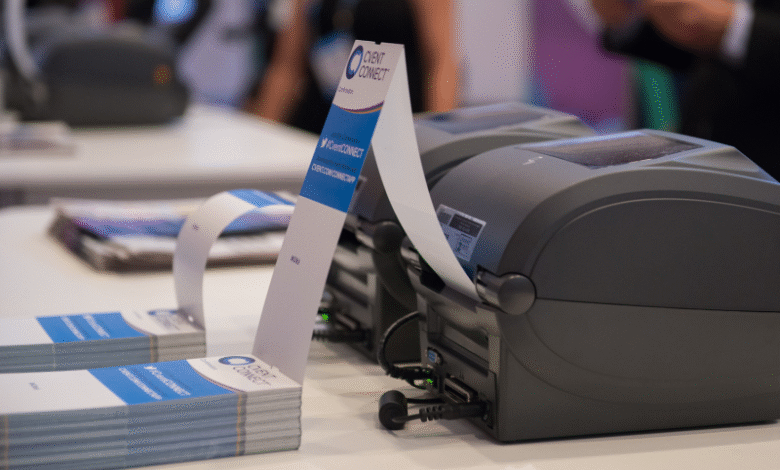
Onsite registration badge printing is a crucial element in modern event planning. Whether you’re organizing a small workshop or a large-scale conference, the check-in experience can set the tone for your entire event. A streamlined badge printing process not only improves attendee satisfaction but also enhances security and data collection.
Let’s walk through everything you need to know to set up a reliable and efficient badge printing system on the day of your event.
What is onsite registration badge printing
This refers to the process of printing name badges or credentials for attendees at the venue, typically as they check in. It combines registration data, badge design, and print technology to produce professional, scannable, and personalized badges within seconds.
The goal is to make check-ins fast, accurate, and smooth—without long lines or manual processing.
Why badge printing matters for event success
Your registration desk is the first point of contact attendees have with your event. A clunky or slow check-in can sour that experience. Efficient badge printing minimizes wait times, ensures accurate credentials, and provides a seamless entry point that leaves a strong first impression.
Choosing the right badge printing system
The first step is picking a system that integrates with your event registration software. Look for solutions that can automatically sync attendee data and print customized badges instantly. Compatibility and speed are key—especially for events with high foot traffic.
Badge design essentials: layout, branding, and readability
A well-designed badge is more than just a name tag. It’s an identifier, a networking tool, and a brand statement. Use large, clear fonts for names, include company or organization details, and ensure color schemes align with your branding. If you’re using QR codes or barcodes, place them where they can be easily scanned.
Integrating registration software with badge printers
Seamless integration allows for real-time updates, like last-minute attendee changes. Choose systems that can pull data directly from your registration platform to reduce manual errors and streamline badge production.
Types of badge printers for onsite use
There are various types of badge printers to consider—direct thermal, inkjet, and laser. Direct thermal printers are popular due to their speed and low maintenance. Choose a printer that suits your event size and required badge quality.
Comparing thermal vs. inkjet vs. laser printers
Thermal printers are fast and ideal for basic black-and-white badges. Inkjet printers offer color and photo printing but require more upkeep. Laser printers are high-quality but slower, making them better suited for smaller-scale or premium badge needs.
QR code and RFID integration for smart badges
Adding QR codes or RFID chips enables smart tracking and access control. QR codes allow for quick check-ins and session tracking, while RFID badges support touchless access and real-time attendee movement data.
Layout planning for onsite registration areas
Your registration space should be clearly marked, accessible, and spacious enough to avoid bottlenecks. Arrange check-in counters or kiosks to allow for smooth flow. Consider signage and floor markings to guide attendees through the process.
Power, connectivity, and backup considerations
Make sure printers are near reliable power sources, with backup batteries or surge protectors in place. Have a stable internet connection—especially if your badge system relies on cloud-based data. Always prepare for offline functionality in case of network issues.
Staff training for smooth badge issuance
Your onsite team needs to be well-versed in the software, hardware, and procedures. Train staff to handle technical issues, reprint badges, and guide attendees. The smoother your team operates, the more efficient the check-in experience will be.
Step-by-step onsite badge printing workflow
Start with attendee check-in—either via scanning a QR code or searching the name in the system. Once verified, the badge is printed and handed over immediately. The entire process should take less than 30 seconds per person with a well-optimized setup.
Handling walk-ins and last-minute registrants
Set up a dedicated area or line for walk-ins. Your system should support instant data entry and badge printing for new registrants. This prevents delays for pre-registered attendees and keeps operations running smoothly.
Avoiding queues and bottlenecks at check-in
Use multiple check-in stations or self-service kiosks to distribute foot traffic. Schedule staggered arrival times if possible and have volunteers on hand to direct attendees. Monitoring peak periods helps with better staffing and station allocation.
Real-time data sync and badge personalization
Live syncing ensures attendee data stays up to date. If someone updates their information last-minute, their badge reflects that change. Personalization features, like session access or meal preferences, can be printed directly on the badge.
Badge printing with photo capture and ID verification
Some systems support photo capture and ID verification onsite. This adds a layer of security and makes badges more personal. It’s especially useful for VIP events, industry expos, or environments requiring strict access control.
Self-service kiosks vs. staffed check-in counters
Self-service kiosks allow attendees to check in and print their own badges, reducing staff needs and speeding up the process. Staffed counters, however, offer a personal touch and help with troubleshooting. Many events use a hybrid approach.
Secure badge encoding: barcodes, NFC, and RFID
Encoding badges with barcodes or RFID chips enhances functionality. They can control access to sessions, track attendance, and even integrate with lead retrieval systems. Keep security in mind—especially for badges that store personal data.
Protecting attendee data at check-in
Ensure your registration and badge printing systems are GDPR-compliant and use encrypted connections. Only authorized staff should have access to sensitive information. Don’t store data unnecessarily and delete old records after the event.
Preventing badge fraud and unauthorized access
Use unique identifiers like QR codes, barcodes, or embedded RFID to validate badges. Consider color coding or holographic elements for added security. Having a digital check-in record also helps detect duplicates or unauthorized entries.
Badge reusability and sustainability practices
Opt for recyclable materials or reusable badge holders when possible. Encourage attendees to return badge holders post-event, and avoid single-use plastics. Many suppliers now offer eco-friendly badge options without compromising on quality.
Data collection and event reporting via badge scans
Every badge scan can provide insights—session popularity, traffic flow, and attendance rates. Use this data to refine future events and demonstrate ROI. Integrated reporting tools can help visualize these metrics for post-event analysis.
Feedback and analytics from the registration process
Collect feedback from your staff and attendees on the check-in experience. Use analytics to identify delays, peak times, or technical issues. Continuous improvement ensures each event becomes more efficient than the last.
Main key takeaways
- Onsite registration badge printing is central to efficient, professional event check-ins.
- Investing in the right technology and setup saves time and reduces friction.
- Design, integration, staff readiness, and security all play a role in successful badge printing.
- Sustainable and data-driven approaches can enhance both experience and insights.
FAQs
What’s the average time to print a badge onsite?
With the right setup, it typically takes 10–30 seconds per badge, depending on hardware and connectivity.
Can badges be reprinted if lost?
Yes, most systems allow for quick badge reprinting by looking up attendee data.
How to ensure accessibility during registration?
Design counters at wheelchair-friendly heights, use large fonts on screens, and train staff to assist attendees with diverse needs.
Is wireless badge printing reliable?
Yes, if backed by a stable network and power source. Always have a wired backup or offline mode available in case of issues.