Fast and Reliable GIF Background Removers Online Free
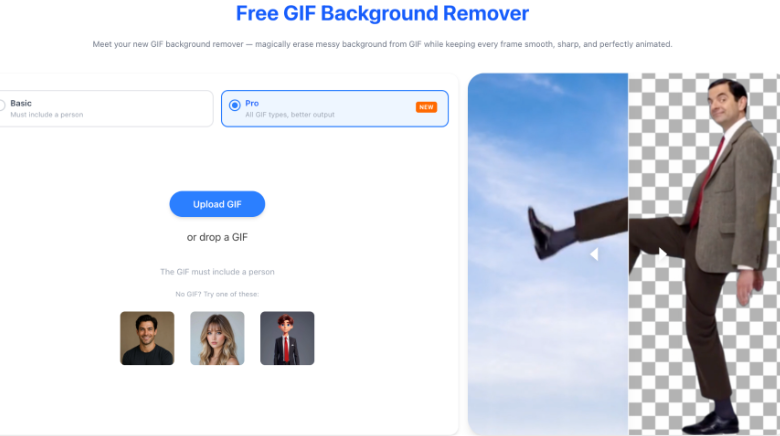
GIFs have become a popular way to share reactions, promote products, create memes, and add motion to digital content. However, many GIFs come with distracting or unwanted backgrounds that don’t fit your design or branding. Whether you’re creating social media posts, website graphics, presentations, or marketing materials, the ability to remove background from GIF files can make your visuals look cleaner and more professional.
Not long ago, editing animated GIFs required advanced software and frame-by-frame adjustments. Today, AI-powered online tools have simplified the process. With just a few clicks, you can upload a GIF, let artificial intelligence detect the subject, and receive a version with the background removed or replaced.
1. BackgroundRemove.io GIF Background Remover
BackgroundRemove.io offers an AI-powered GIF background removal tool designed to make editing animated images quick and effortless. Instead of processing each frame manually, the platform automatically analyzes the animation and identifies the main subject throughout the GIF.
The online interface is clean and straightforward, making it accessible even for users with no editing experience. Upload your GIF, let the AI process it, and download the edited version within minutes.
Key Features
- AI-powered GIF background removal
- Online processing with no software installation
- Automatic subject detection
- Fast cloud-based rendering
- Suitable for animated graphics and marketing content
Best For
- Social media creators
- Designers
- Marketing teams
- Online stores
- Meme creators
The platform is ideal for anyone who wants professional-looking GIFs without spending time on complicated editing.
2. RemoverAI.io GIF Background Remover
RemoverAI.io brings advanced artificial intelligence to animated image editing. It focuses on preserving subject quality while removing complex backgrounds across every frame of a GIF.
One of its strengths is maintaining smooth edges around people, products, pets, and objects, helping create natural-looking animations after background removal.
Highlights
- Intelligent AI frame analysis
- Accurate edge detection
- Browser-based workflow
- Fast upload and processing
- Beginner-friendly interface
Perfect For
- Product demonstrations
- Animated advertisements
- Educational content
- Creative projects
- Branding materials
Users looking for reliable AI performance with minimal effort will appreciate its simple editing experience.
3. Unscreen
Unscreen has earned a strong reputation for removing backgrounds from moving content, including GIFs and short videos. Rather than relying on manual masking, the platform automatically detects the foreground subject and removes the surrounding background.
After processing, users can either download the transparent animation or replace the background with another visual.
Features
- AI-powered background removal
- Supports animated GIFs
- Automatic processing
- No green screen required
- Simple online editor
Its speed and ease of use make it popular among content creators who publish animated graphics regularly.
4. Canva
Canva is widely recognized as a graphic design platform, but it also includes AI-powered editing tools that can help creators work with animated graphics.
After removing a GIF’s background, users can immediately continue editing by adding text, branding elements, icons, or custom backgrounds without switching applications.
Advantages
- Drag-and-drop editing
- Integrated design workspace
- Extensive template collection
- Brand management tools
- Cloud-based access
This combination makes Canva especially attractive for businesses creating marketing materials and promotional campaigns.
5. Adobe Express
Adobe Express combines AI-powered editing with an easy-to-use online design platform. Its background removal capabilities integrate well with the rest of Adobe’s creative tools, allowing users to continue editing after the background has been removed.
This creates a smooth workflow for those producing branded graphics, advertisements, and animated content.
Key Benefits
- AI-assisted editing
- High-quality output
- Professional design tools
- Easy customization
- Cloud-based workflow
Adobe Express is particularly useful for creators seeking both simplicity and professional editing features.
Why Remove Backgrounds from GIFs?
Animated GIFs often include distracting environments that reduce their visual impact. Removing the background allows creators to reuse the subject in different designs while maintaining a clean and professional appearance.
Benefits of AI-Powered GIF Background Removal
Artificial intelligence has transformed what was once a time-consuming editing task into an automated process.
Saves Time
Instead of editing dozens or hundreds of animation frames individually, AI processes the entire GIF automatically.
Easy for Beginners
Most online tools require only three steps:
- Upload your GIF.
- Let the AI analyze the animation.
- Download the finished result.
Better Accuracy
Modern AI can recognize people, products, animals, and objects while preserving important details such as hair, clothing, and fine edges.
No Software Installation
Everything runs inside your web browser, making these tools accessible from almost any computer.
Faster Content Creation
Designers and marketers can produce professional graphics much more quickly, helping meet tight deadlines and maintain consistent branding.
Final Thoughts
Animated content continues to play an important role in digital communication, making efficient editing tools more valuable than ever. Whether you’re creating branded graphics, social media content, online advertisements, or website animations, the ability to remove background from GIF files can significantly improve the final result.
Among today’s Best 5 GIF Background Removers Online (Free & Fast), BackgroundRemove.io and RemoverAI.io deliver fast, AI-powered workflows that simplify what was once a highly technical editing task. Alongside trusted platforms like Unscreen, Canva, and Adobe Express, they rank among the Best 5 GIF Background Removers Online (Free & Fast) for creators who want professional-looking animations without the hassle of manual editing.
Meta Description:
Want to make your GIFs stand out? Get the best free online tools for removing GIF backgrounds in seconds and create cleaner, more professional animations with ease.