How to Turn One Product Video Into Five Platform-Ready Versions Without Starting Over
A product video can work perfectly in one place and feel awkward in another.
A clip designed for a product page may be too restrained for a social post. A vertical composition may crop badly in a wider placement. A lifestyle background that feels natural in a campaign may distract from the product on a shopping page.
The problem is not necessarily the quality of the original video. It is that different channels ask the same asset to do different jobs.
One way to handle that is to create every version separately. Another is to start with one approved base clip and adapt it into several channel-specific variants.
The second approach can make more sense when the product itself should remain visually consistent while the surrounding presentation changes.
Start With a Base Clip You Trust
The base video should contain the version of the product you are comfortable reusing.
That means the product shape, color, material, framing, and motion should already be close to what the brand wants to show.
It does not need to be the final version for every channel.
Think of it as the master visual source: the approved product representation from which other versions can branch.
Once that base exists, platform adaptation becomes a question of context.
Which background fits the placement?
How tight should the framing be?
Should the lighting feel more lifestyle-oriented or more neutral?
Does the composition need more breathing room?
Those decisions can change while the core product treatment stays anchored to the same source clip.
Create Platform Variants From the Same Source
Some AI video workflows can help turn one base clip into several visual variants through natural-language edits.
Gemini Omni, for example, supports iterative video editing from an existing result. A creator can continue from the current clip and request targeted changes rather than restating the entire scene from the beginning.
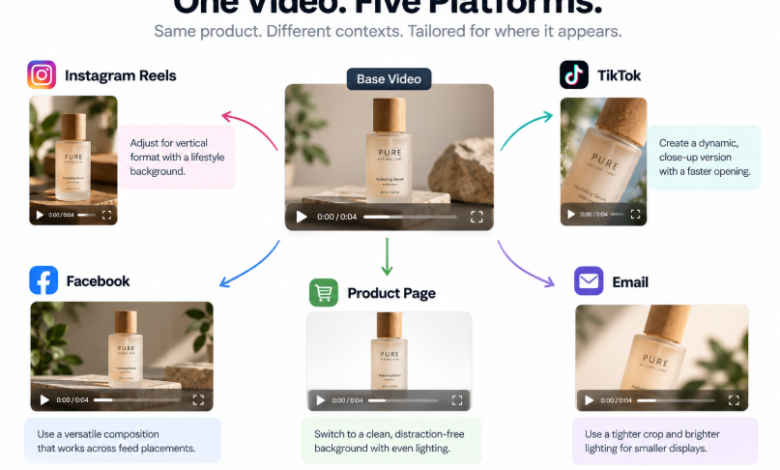
For Instagram Reels, the instruction might focus on a vertical-friendly composition and a warmer lifestyle background.
For TikTok, the creator might ask for a tighter opening frame or a more immediate close-up before revealing the full product.
For Facebook, the goal may be a more flexible composition with enough space around the product to work across feed placements.
For a product page, the request could move toward a clean background, balanced lighting, and fewer environmental distractions.
For email, the edit might use a tighter crop and clearer product emphasis so the image still reads when displayed at a smaller size.
Each variant should branch from the same approved base clip rather than from the previous platform version. That keeps the workflow easier to review because every adaptation can be compared directly with the same source.
Consistency Is the Goal, Not a Guarantee
Using the same base clip can help maintain a more consistent product representation across channels, but generated variants still need review.
The system may reinterpret small details while changing the background, lighting, crop, or pacing.
That matters for product marketing.
A label can shift. A reflective surface can change. A color can move slightly warmer or cooler. A small accessory can look different from the source.
For that reason, the original product clip should remain the factual reference.
The adapted versions are useful only if they still represent the product accurately enough for the context in which they will appear.
If a generated edit changes the item itself in a way that could mislead a buyer, that version should be rejected or rebuilt.
What to Change — and What to Leave Alone
Platform adaptation works best when the changes are about presentation rather than product identity.
Useful changes include:
• Background treatment
• Overall lighting mood
• Framing and crop
• Camera emphasis
• Pacing or shot order
• Environmental context
Changes that alter the product itself deserve much more caution.
Changing the actual colorway, material, shape, packaging, finish, or proportions can turn a harmless creative variation into an inaccurate representation.
That distinction is important.
A platform version should adapt how the product is presented, not silently invent a different product.
Finish Brand Elements in a Traditional Editor
Text overlays, logos, price labels, legal copy, and call-to-action buttons are better handled separately when precision matters.
Generated video can be a useful visual base layer, but branded typography needs exact fonts, spacing, alignment, and wording.
The same is true for platform-specific overlays.
A team can create the visual variant first, then add the final copy, logo, CTA, and formatting in a conventional editor or design tool.
That keeps the flexible part of the workflow — background, framing, style, pacing — separate from the precise part — text, branding, compliance, and interface-safe placement.
A Practical Five-Version Workflow
A simple multi-channel workflow can look like this:
1. Approve one base product clip.
2. Duplicate the base into separate platform branches.
3. Define one clear adaptation goal for each branch.
4. Review each result against the original product.
5. Add final text and branding in a traditional editor.
6. Export each version in the correct format for its destination.
The important step is number two.
Do not keep editing the Instagram version until it becomes the TikTok version, then keep editing that until it becomes the email version.
Branch from the same source.
That way, every channel-specific version starts from the same approved product representation, and differences are easier to identify.
One Asset, Several Contexts
A good product video does not have to be a single-use deliverable.
It can be the visual foundation for several channel-specific assets.
The product page may need clarity.
Social content may need more atmosphere or movement.
Email may need stronger framing at a smaller size.
A broader feed placement may need more space around the subject.
Those are presentation differences, not reasons to rebuild the entire creative concept each time.
Starting from one trusted clip and adapting the context around it gives teams a practical middle ground between posting the exact same asset everywhere and producing every version independently.
The base stays familiar. The presentation changes to fit where the video is going.