When Product Videos Need to Move Faster Than Your Competitors
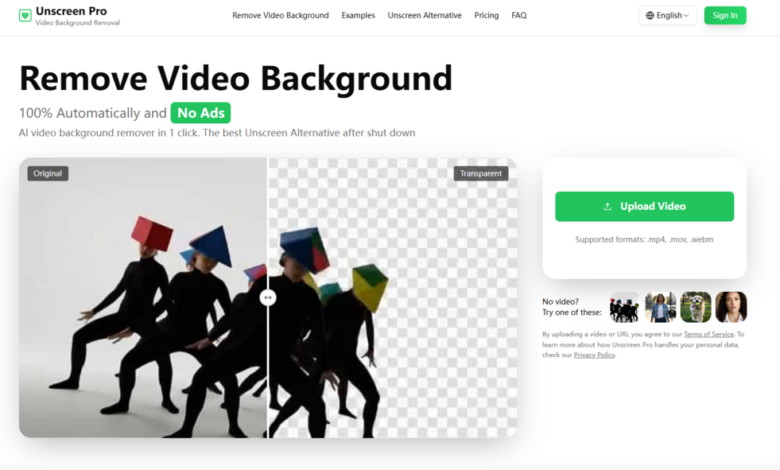
In the time it takes to set up a greenscreen, a competitor just posted three product demos. That’s the reality of modern commerce, where visual content dictates purchasing decisions and delays directly cost revenue. For small business owners, marketplace sellers, and marketing teams, the gap between “I have a great product” and “I have a polished video” has historically been filled with expensive studios, complicated software, or awkward workarounds. That gap, however, is closing faster than most people realise. A tool that used to require hours of manual masking now operates in minutes, and the shift is most visible when you actually put it through a real‑world production day. So I decided to do exactly that—take a full afternoon of typical e‑commerce video tasks and see whether Unscreen remove video background could keep up without forcing me back to the editing suite.
The Real‑World Test: Three Common Product Scenarios
Instead of running abstract benchmarks, I picked three tasks that online sellers and content marketers handle weekly: a rotating product shot, a spoken‑word demonstration, and a group composition. Each presents different challenges for background removal, and each reflects a genuine production bottleneck.
Scenario One: The 360‑Degree Product Spin
Why This Usually Fails Without a Studio
Shooting a product on a turntable against a plain background seems simple, but reflections, shadows, and slight movements often trip up automatic removal tools. I used a glossy ceramic mug with metallic lettering, placed on a white countertop with natural window light. The camera stayed fixed while the mug rotated slowly over ten seconds. The background included a window frame, a plant, and some cables—distractions that would ruin any marketplace listing.
How the Tool Handled Gloss and Movement
Uploading the MP4 clip took under a minute. The processing completed in about ninety seconds—the site mentions that shorter clips typically finish within two minutes. The preview showed a clean isolation of the mug throughout the rotation. The metallic sheen, which I expected to cause edge flicker, remained stable. The only visible artifact was a faint softness around the handle during the half‑turn where the light caught the glossiest curve—barely noticeable at 1080p, and entirely fixable with a simple crop. For a product listing, the result was more than acceptable. The free preview let me verify that before making any commitment, which removed the anxiety of paying for an uncertain outcome.
Scenario Two: The Personable Explainer
The Challenge of Movement and Speech
For the second test, I filmed a colleague explaining the features of a small electronics gadget. She stood in a cluttered office with bookshelves, monitors, and a coffee mug in the background. She moved her hands frequently, pointed at the device, and shifted her weight. Traditional keying would have required careful lighting and a solid backdrop—neither of which were available.
What the AI Actually Delivered
The upload and processing took roughly three minutes for a forty‑second clip. The subject separation was surprisingly solid. Hand gestures that passed close to the face did not trigger the jittery edge breaks I have seen from other automatic services. The hair—shoulder‑length and slightly wavy—held together reasonably well, though a few flyaway strands merged with the background during the most vigorous pointing motion. From a practical user perspective, this level of quality is sufficient for social ads, website hero videos, and internal training materials. The watermark on the free preview was unobtrusive enough to evaluate the full clip, and the paid export removed it entirely at the click of a button.
Scenario Three: Group Shot with Multiple Products
Why Multiple Subjects Create Complexity
E‑commerce often requires showing several items together—a bundle deal, a set of accessories, or a family of products. I placed three different objects on a wooden table: a phone, a notebook, and a pair of headphones, spaced apart but close enough that their edges occasionally overlapped. The background included a brick wall and a hanging lamp.
Where the Tool Succeeded and Where It Hesitated
The platform’s AI identified each object as part of the foreground, but the separation between overlapping items was not always perfect. Where the phone and notebook touched, the edge blended slightly. However, the overall composition remained clean enough for a banner image or a carousel slide. If you need absolute isolation of each individual product, you would still need to shoot them separately—but for a general lifestyle shot, the result worked. The processing time for this thirty‑second clip was about two minutes, consistent with the site’s claim that most videos complete within a few minutes.
How the Actual Workflow Unfolds on the Site
The platform’s step‑by‑step process is deliberately minimal, which suits production environments where speed matters more than configuration.
Step One: Bring Your Video to the Uploader
No Registration Required for Testing
You are not asked to create an account before uploading. The main interface accepts drag‑and‑drop or a direct URL from hosting services. Supported formats include MP4, MOV, AVI, and WebM, which covers virtually all camera and smartphone outputs. The upload is encrypted, and the site states that files are automatically removed from servers within 24 hours—a detail that matters for commercial footage containing sensitive prototypes or unreleased products.
Step Two: Let the AI Process Automatically
What Happens During the Wait
Once uploaded, the system analyses each frame without any manual input. You do not select a subject, define a background, or adjust thresholds. The processing speed depends on length and resolution; my tests ranged from one to three minutes. The site does not promise instant processing, and longer clips will take longer, but the wait is entirely passive—you can continue other work while the preview renders.
Step Three: Preview the Clean Result
The Decision Point Without Risk
After processing, you see a full preview with a subtle watermark. You can scrub through the timeline, zoom in on edges, and assess quality. This preview is permanent—you can revisit it later without re‑uploading. The free tier allows watermarked downloads for personal use, while paid plans remove the watermark and grant commercial rights. The key advantage is that you never pay before seeing the actual output for your specific footage.
Comparing the Traditional and New Approaches
To frame the practical difference, consider how each method stacks up against the daily reality of video production:
| Factor | Manual Masking (Premiere/After Effects) | Greenscreen Setup | Unscreen Pro |
| Prep Time | None, but labour starts immediately | 30–60 minutes for lighting and backdrop | 1 minute to upload |
| Skill Required | High—rotoscoping and keyframing | Moderate—even lighting is tricky | None—upload and wait |
| Per‑Video Cost | Billable hours ($50–$200+) | Equipment depreciation + setup time | $0 for preview, $4.99+/month for commercial |
| Consistency | Fully controllable but time‑consuming | Consistent with perfect lighting | Generally reliable, varies with motion |
| Flexibility | Works on any footage | Requires controlled shooting environment | Works on any footage, any location |
| Turnaround | Hours for a minute of footage | Real‑time during shoot | 2–5 minutes average |
This table reflects real trade‑offs. The tool does not replace high‑end VFX work, but for the vast majority of commercial video needs, it eliminates the overhead without sacrificing acceptable quality.
Where the Tool Fits Best in a Production Pipeline
Different teams will use this differently based on their output volume and quality standards.
E‑Commerce Sellers and Marketplace Vendors
If you list products on Amazon, Etsy, or Shopify, clean background videos significantly improve conversion rates. The ability to shoot anywhere—your garage, a warehouse, or a trade show floor—and still get a polished result means you can update listings daily rather than waiting for a monthly studio session.
Social Media Managers and Ad Creators
Platforms like Instagram, TikTok, and Facebook favour short, dynamic clips. The rapid turnaround allows you to test multiple versions with different backgrounds, call‑to‑action overlays, or brand colours. The commercial licence included in paid plans removes any legal ambiguity around using the output in paid advertising.
Corporate Training and Internal Comms
Remote teams often record updates on laptops in home offices. Removing distracting backgrounds instantly makes these videos look more professional without requiring employees to become videographers. The 1080p output suffices for internal screens and most presentation decks.
Honest Limitations You Should Know Before Relying on It
Based on my testing and the site’s own disclosures, a few constraints are worth keeping in mind:
Fast motion and severe blur can degrade edge quality. Clips with rapid camera pans or subjects moving at speed may show occasional softness. The result may vary depending on the footage.
Transparent or reflective objects—glassware, shiny metal, or wet surfaces—can confuse the AI because the background warps through them. For such items, you may need additional manual cleanup or accept that the output will have minor artefacts.
Processing time is not instant for long videos. The site states most process within a few minutes, but a 4K clip exceeding one minute could take significantly longer. The Pro tier offers priority processing, which is worth considering for bulk workflows.
The 4K upscale feature is listed as “soon” rather than fully available. If you require ultra‑high‑resolution exports today, verify current capabilities before subscribing.
A Practical Verdict for Busy Creators
This tool is not designed to win Academy Awards for visual effects. It is designed to solve a daily nuisance: removing an unwanted background quickly, affordably, and without specialised equipment. In my afternoon of testing, it handled three common commercial scenarios with a success rate that would have saved hours of manual work. The free preview eliminates the guesswork, and the tiered pricing means you only pay when the tool actually delivers value for your specific content.
For sellers, marketers, and internal teams who produce video regularly but cannot justify studio budgets or advanced editing skills, Unscreen Pro offers a practical bridge between raw footage and publishable content. The old way of setting up greenscreens or rotoscoping frame by frame is not obsolete, but it is no longer the only way—and for many, it is no longer the best way.