Boost Your Gaming with a Durable Customizable Keyboard
In competitive gaming, every millisecond counts, and your peripherals can mean the difference between victory and defeat. While many players invest heavily in graphics cards and monitors, the keyboard—your primary input device—often gets overlooked. Standard keyboards present frustrating limitations: mushy keys that fail to register rapid inputs, flimsy construction that deteriorates after months of intense use, and a one-size-fits-all design that ignores how different players interact with their games. These shortcomings directly impact reaction time, accuracy, and overall enjoyment. The solution lies in a durable gaming keyboard built with customizable features that adapt to your unique playstyle. From precise tactile feedback that confirms every keypress to flexible keyboard layout options that optimize hand positioning, the right keyboard transforms how you engage with games. Whether you need programmable macros for complex ability rotations or a compact form factor that gives your mouse arm more room to maneuver, a well-chosen customizable keyboard becomes an extension of your intent—turning thought into action with unmatched speed and reliability.
Why a Durable Gaming Keyboard is Essential for Long-Term Performance
Competitive gaming pushes hardware to its limits. During intense sessions, players execute thousands of keypresses per hour—rapid-fire ability combos, repeated WASD movements, and split-second reactive inputs that pound switches relentlessly. Over weeks and months, this punishment exposes the weaknesses of standard keyboards: stabilizers loosen, keycaps develop shine and lose grip, membrane contacts degrade, and entire keys begin double-registering or failing to actuate consistently. A durable gaming keyboard engineered for this abuse changes the equation entirely. Premium builds incorporate aluminum or steel frames that resist flex during aggressive play, PBT keycaps that maintain their texture through years of friction, and mechanical switches rated for 50 to 100 million actuations. This durability translates directly into gameplay reliability—you never lose a crucial teamfight because a key stuck or failed to register. Beyond performance consistency, longevity makes financial sense. Replacing a cheap keyboard every eight months quickly surpasses the cost of one well-built board that lasts five years or more. When your keyboard maintains its crisp, predictable response thousands of hours into its lifespan, you eliminate a variable from your performance equation and focus entirely on improving your skills. That sustained reliability creates confidence in your equipment, which itself enhances your gaming experience during high-pressure moments.

Harnessing the Power of a Customizable Keyboard for Personalization
A customizable keyboard does more than look impressive on your desk—it fundamentally reshapes how you interact with every game in your library. Macro keys let you bind complex input sequences to a single press, turning elaborate ability rotations in MMOs or intricate build patterns in strategy games into effortless one-tap executions. Key remapping goes further, allowing you to place critical commands exactly where your fingers naturally rest, eliminating awkward stretches that cost precious reaction time. RGB lighting serves a functional purpose beyond aesthetics: color-coded zones help you locate key clusters in dim environments, and reactive lighting profiles provide visual confirmation of cooldown timers or mode switches without pulling your eyes to the screen’s UI. Software suites from major manufacturers enable per-game profiles that automatically load when you launch a title, so your MOBA bindings never interfere with your FPS layout. This level of personalization means your gaming keyboard conforms to you rather than forcing you to adapt to it. Players who invest time configuring their customizable keyboard report faster muscle memory development because their layout mirrors their mental model of the game. The result is a seamless connection between decision and execution—your keyboard disappears as an obstacle and becomes a transparent conduit for your intentions, boosting both efficiency and enjoyment across every genre you play.

Key Features Deep Dive: Tactile Feedback and Keyboard Layout
Two features fundamentally shape how a gaming keyboard performs under your fingers: tactile feedback and keyboard layout. While flashy RGB and macro keys grab attention, these underlying characteristics determine whether your inputs feel precise or sloppy, whether marathon sessions leave your hands cramped or comfortable. Understanding both allows you to select a board that genuinely complements your reflexes rather than working against them.
Understanding Tactile Feedback for Enhanced Gaming Accuracy
Tactile feedback refers to the physical bump or resistance you feel at the actuation point of a mechanical switch—the exact moment your keypress registers. Switches like Cherry MX Browns deliver a subtle bump that confirms actuation without requiring you to bottom out the key, while heavier options like Cherry MX Clears provide a more pronounced tactile event for players who want unmistakable confirmation. This matters because tactile feedback lets your fingers “know” a command registered without visual verification, enabling faster follow-up inputs. In fast-paced shooters, that split-second certainty means you’re already moving to the next action while competitors are still pressing harder, hoping their input went through. For rhythm games and precision platformers, consistent tactile response reduces timing errors because your muscle memory calibrates to a reliable physical sensation rather than guessing. Linear switches like Cherry MX Reds sacrifice this bump for smoother travel, which some players prefer for rapid repeated presses—but they demand more developed finger discipline since there’s no physical landmark signaling actuation.
Optimizing Gameplay with the Right Keyboard Layout
Your keyboard layout dictates hand positioning, available desk space, and how naturally you reach essential keys. Full-size boards include a number pad useful for MMO bindings or simulation controls, but they push your mouse hand further right, forcing a wider arm angle that can strain shoulders during long sessions. Tenkeyless layouts remove the numpad, reclaiming roughly four inches of desk space and allowing a more natural arm position—a meaningful ergonomic improvement for FPS players who need wide mouse sweeps. Compact 65% and 60% layouts go further, eliminating function rows and navigation clusters to create a minimal footprint that maximizes mousepad territory. However, these require layer-based key access through function combinations, which adds complexity. Ergonomic split layouts separate the keyboard into halves, letting each hand rest at a natural angle that reduces ulnar deviation and wrist fatigue. Choosing the right keyboard layout depends on your genre priorities: competitive FPS players typically benefit from tenkeyless or smaller, while MMO and strategy enthusiasts often need full-size or layouts with dedicated macro columns for accessible command density.

Step-by-Step Guide to Choosing the Best Durable Customizable Keyboard
Selecting the right durable customizable keyboard requires a systematic approach that balances build quality, personalization options, and gameplay needs. Rather than impulse-buying based on brand recognition or aesthetics alone, follow these steps to find a board that genuinely elevates your performance for years to come.
First, assess durability features by examining the frame material and construction. Aluminum or steel top plates resist warping and flex far better than plastic housings, and they add satisfying heft that prevents the keyboard from sliding during intense moments. Check keycap material—PBT plastic resists shine and maintains texture indefinitely compared to ABS, which degrades within months of heavy use. Verify the switch lifespan rating, prioritizing options rated for 70 million actuations or higher, and confirm that switches are hot-swappable so you can replace individual units without soldering if one eventually fails.
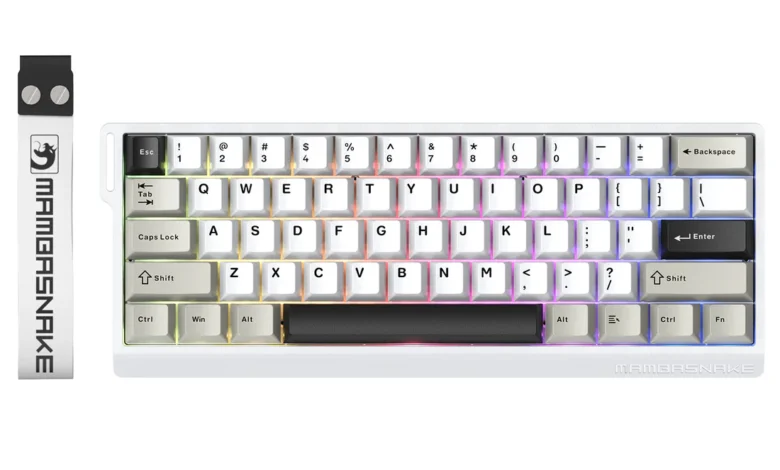
Second, evaluate customization options on both the hardware and software side. Look for boards offering onboard memory that stores profiles directly on the keyboard, ensuring your settings travel with you to LAN events or different machines. Dedicated macro keys or fully programmable layouts expand your binding options, while detachable cables and modular components signal a design philosophy oriented toward long-term adaptability. Brands like MAMBASNAKE have embraced this approach, offering hot-swappable mechanical keyboards with customizable RGB and robust build quality at accessible price points. Companion software should feel intuitive—clunky interfaces discourage experimentation and leave powerful features unused.
Third, match tactile feedback and keyboard layout to your primary gaming genre. If you play competitive shooters demanding rapid repeated inputs, consider linear or lightly tactile switches paired with a tenkeyless or 65% layout that maximizes mouse space. MMO and strategy players benefit from full-size or macro-equipped boards with pronounced tactile switches that confirm each deliberate command. Try multiple switch types at a local retailer or order a switch tester before committing.
Finally, set a realistic budget and compare models within that range. Identify two or three candidates that satisfy your durability and customization requirements, then read long-term user reviews focusing on reliability after six months or more of use. A slightly higher upfront investment in a well-built durable gaming keyboard consistently outperforms cycling through cheaper alternatives, saving money while delivering a superior, uninterrupted gaming experience throughout its lifespan.
Maximizing Your Setup: How to Configure Your Keyboard for Peak Gaming Performance
Once you’ve chosen your durable customizable keyboard, proper configuration unlocks its full potential. Start by installing the manufacturer’s customization software and building game-specific profiles—assign macros to dedicated keys for your most-played titles, and configure RGB zones that highlight essential key clusters so your fingers find them instinctively during heated moments. Next, fine-tune your tactile experience by experimenting with switch types if your board supports hot-swapping; try lighter switches for games demanding rapid repeated inputs and heavier tactile options for titles where deliberate, confirmed presses matter more. Position your keyboard ergonomically by angling it slightly and placing it so your wrists remain neutral and your elbows sit at roughly 90 degrees—this reduces fatigue during extended sessions and keeps reaction times consistent even hours into a gaming marathon. Finally, dedicate time after each session to evaluate what felt awkward. Rebind keys that required uncomfortable stretches, adjust macro timing if sequences fire too quickly, and refine lighting profiles that proved distracting rather than helpful. This iterative process ensures your durable customizable keyboard evolves alongside your skills, consistently delivering peak performance tailored precisely to how you play.
Invest in Durability and Customization for Lasting Gaming Excellence
A durable gaming keyboard built with customizable features isn’t a luxury—it’s a strategic investment that pays dividends across every gaming session. The durability factor ensures your hardware keeps pace with thousands of hours of intense play, eliminating frustrating malfunctions and the recurring cost of replacements. Customization transforms a generic input device into a personalized command center, with macro keys, remappable bindings, and per-game profiles that streamline your interactions and accelerate muscle memory development. Underneath these headline features, tactile feedback and keyboard layout quietly determine whether your inputs feel confident and precise or uncertain and fatiguing. Choosing the right switch type gives your fingers reliable confirmation of every command, while selecting an appropriate layout optimizes hand positioning, desk space, and comfort for your preferred genres. Together, these elements create a keyboard that works with your instincts rather than against them. Use the step-by-step guide above to evaluate your options systematically, then dedicate time to configuring and refining your setup after purchase. The players who treat their keyboard as a tool worth mastering—not just a commodity to replace—consistently find themselves performing with greater speed, accuracy, and enjoyment. Your ideal durable customizable keyboard is waiting to become the foundation of your best gaming yet.