Choosing the Right GPT Image 2 Platform in 2026: A Real-World Comparison of 8 Generators
Introduction
When OpenAI shipped GPT Image 2 on April 21, 2026, the launch wasn’t accompanied by the usual fanfare — but the reaction was anything but quiet. Within days, the model had taken the largest lead in Image Arena history, with
evaluators repeatedly picking it in blind head-to-heads until the scoreboard looked lopsided
. Reviewers and creators almost unanimously called it a step-change in what AI image models can do.
What makes GPT Image 2 different isn’t just prettier pictures. It’s a reasoning-heavy model: it plans, researches, and self-corrects before producing pixels.
It is the first OpenAI image model with built-in reasoning, and the headline upgrades are its text rendering accuracy, neutral color rendering across scene types, deeper world knowledge for sparse prompts, and resolution support up to 4K.
Early testers on Reddit have been blunt:
one r/LocalLLM user argued that GPT Image 2 “killed the yellow filter” and made everyday scenes feel like usable tools rather than sterile AI art, and a r/ChatGPTPro post called the “character consistency + text rendering upgrades wild,” describing one session that produced product photography, an infographic, an iOS meditation app UI mockup, and a cyberpunk editorial illustration.
But the model itself is only half the story. Where you access GPT Image 2 — which third-party platform you sign up for — determines your pricing, your workflow, and ultimately whether the model is a delight or a daily frustration. This guide walks through 8 platforms currently serving GPT Image 2, with feature analysis grounded in real user reviews and community feedback.
TL;DR — Quick Comparison Table
| # | Platform | Best For | Pricing Model | Pricing From | API Access | Free Tier |
| 1 | APIPass | Unified multi-model API hub for developers | Pay-as-you-go credits | $0.004545/credit | ✅ Yes | ✅ Starter credits |
| 2 | GPTImage2AI | Non-technical creators wanting a subscription tool | Monthly/yearly subscription | $9.90/month (yearly) | ❌ No | ✅ Limited |
| 3 | Picsart | Mainstream creators wanting a full design suite | Credit-based subscription | $15/month (Pro) | ✅ Enterprise | ✅ 5 credits/week |
| 4 | Higgsfield | Creators needing image + video in one platform | Credit-based subscription | Credit-based, tiered | ✅ Limited | ✅ Free trial |
| 5 | WaveSpeed AI | Simple REST API with fixed pricing | Per-image, pay-as-you-go | $0.10/image | ✅ Yes | ✅ Free playground |
| 6 | OpenRouter | GPT-5.4 + Image 2 multimodal workflows | Token-based pay-as-you-go | $8/M input tokens | ✅ Yes | ❌ No |
| 7 | fal.ai | Token-level control and production API | Token-based pay-as-you-go | $0.01/image (low) | ✅ Yes | ✅ Playground |
| 8 | Replicate | Developer flexibility with BYOK support | Per-image, pay-as-you-go | $0.012/image (low) | ✅ Yes | ❌ No |
All pricing as of May 2026. GPT Image 2 cost varies significantly by quality tier and resolution.
1. APIPass — The Unified AI API Marketplace
APIPass takes a fundamentally different approach to GPT Image 2 access: instead of being yet another single-model wrapper, it aggregates dozens of premium AI models behind a single API key.
APIPASS is an API marketplace and integration platform that aggregates multiple AI models (text-to-image, image-to-video, and other AI services) behind a single, consistent RESTful API. Developers can browse, test in a playground, obtain API keys, and call varied providers such as Midjourney, DALL·E, Stable Diffusion, Kling, and Runway through one endpoint. The platform includes comprehensive documentation, webhook support, usage monitoring, and pricing options with free starter credits.
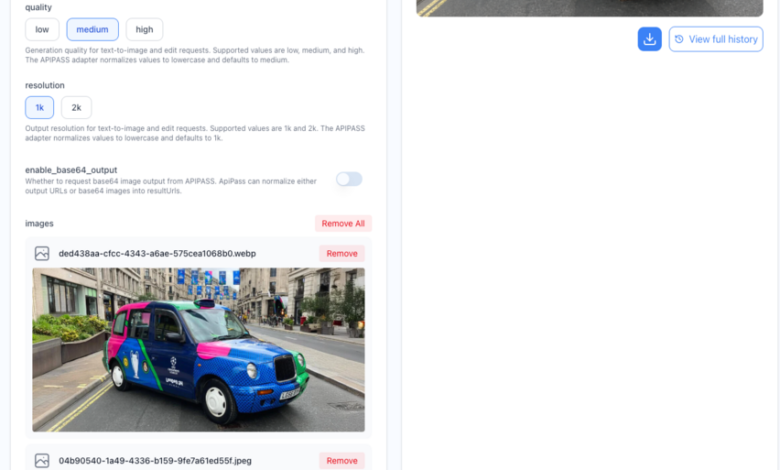
Beyond text-to-image, GPT Image 2 on APIPass also lets you Edit image with AI — upload a reference image with a natural-language edit instruction and get clean, artifact-free modifications back in a single call.
Real-world feedback emphasizes the speed advantage. One agency testimonial on the APIPass site reports:
“Our agency creates content for dozens of clients, and we needed reliable access to multiple AI models. This platform delivers exactly that. The Kling and Runway video APIs have transformed our workflow. What used to take days now takes hours. The quality is consistently excellent, and the API never lets us down.”
Features
One key, many models:
- A unified endpoint to access world-leading models like Kling AI, Runway, Midjourney, and Claude.
- AI image editing: PS-level edits via reference image + prompt, no masks needed.
Interactive playground:
- Test any API directly in your browser before writing a single line of code to ensure the results meet your requirements.
- Webhooks and async jobs: Built for long-running generations.
Analytics dashboard:
- Real-time analytics including request counts, response times, error rates, and usage costs. Set up custom alerts for usage thresholds, monitor performance metrics, and access detailed logs for debugging and optimization.
High-volume infrastructure:
- Handle high-volume tasks with ease. The optimized infrastructure of APIPASS ensures no queues and quick response times, delivering results in minutes.
4K output:
- Support for up to 4K resolution images and HD video generation.
Pros & Cons
Pros
- Single credential covers GPT Image 2 plus dozens of other top models
- Premium AI models at prices lower than competitors like Fal.ai, with flexible pricing options to suit all user levels.
- No queue waits — fast infrastructure tested by production agencies
- Free starter credits for evaluation
- Strong AI editing endpoint for one-step image modification
Cons
- Developer-oriented — non-coders will need a wrapper
No reviews yet on some third-party directories
- , since the platform is still building its community presence
- Credit math takes a moment to map onto per-image cost
Pricing
APIPASS operates on a pay-as-you-go pricing model, offering a credit package of 275,000 credits for $1,250. Each API usage is billed per credit, with a per-credit rate of $0.004545.
Best For
Developers, agencies, and SaaS teams that want one unified API for GPT Image 2 plus the rest of the leading image/video/LLM ecosystem.
2. GPTImage2AI — Dedicated Consumer Platform for GPT Image 2
GPTImage2AI is a single-purpose web app built entirely around GPT Image 2. There’s no API, no provider switcher, no model marketplace — just a polished interface for creators who want to type prompts, drop in reference images, and walk away with print-ready files. Most real-world reviews of GPT Image 2 emphasize that its strongest use cases are precision-driven;
the exceptional level of adherence to the prompt is arguably the model’s greatest strength, making it an indispensable tool for users who want their exact vision translated into pixels without compromise
. GPTImage2AI is built to surface that strength without coding overhead.
Features
- No-code generation and editing directly in the browser
- Native 2K output on all paid plans; 4K upscaling on Pro and Max
- Character consistency: Lock a face or object across scenes
- Natural-language editing: Inpainting, outpainting, background replacement without masks
- Style fusion: Blend reference images into a single aesthetic
- Watermark-free commercial exports on all paid tiers
Pros & Cons
Pros
- Lowest-friction way to start using GPT Image 2
- Clear credits-to-images mapping makes budgets predictable
- Character lock genuinely helps brand storyboards and series
- 4K upscaling makes outputs print-ready
No A/B testing roulette:
unlike ChatGPT Plus, which is A/B tested so you might have the feature one day and lose it the next
- , GPTImage2AI gives consistent access
Cons
- No API — automation pipelines aren’t possible
- Per-image cost is higher than calling fal.ai or APIPass directly
- Single-model focus means you can’t compare against alternatives in-platform
Limited features for advanced layout/typography work — a known GPT Image 2 weakness mentioned by
- design-first reviewers on r/graphic_design who argue generators cannot follow precise technical instructions properly
Pricing (yearly billing)
- Basic: $9.90/month — 18,000 credits/year (~1,800 images)
- Pro: $19.90/month — 48,000 credits/year (~4,800 images) + 4K upscaling
- Max: $34.90/month — 102,000 credits/year (~10,200 images) + priority queue + VIP support
Best For
Solo creators, freelance designers, and small marketing teams who want a dedicated, no-fuss GPT Image 2 experience with predictable monthly costs.
3. Picsart — GPT Image 2 Inside a Full Creative Suite
Picsart’s AI Playground lets users access GPT Image 2 alongside dozens of other models through a single account.
AI Playground provides access to all 24 providers through your single Picsart account. You don’t need to create accounts with Google, OpenAI, Runway, Kling, ElevenLabs, or any other provider. No API keys to manage, no separate billing to track, no terms of service to review individually. One login, one credit balance, every model.
For creators already living inside Picsart’s photo and video tools, this turns GPT Image 2 into one drop-down option among many.
User sentiment leans positive on convenience but cautious on pricing.
Picsart has done more of what it promised than many tools in this space. The AI investment is real, the mobile experience remains best-in-class for quick editing, and the AI Playground represents a genuine architectural bet on aggregating AI model access rather than competing on a single proprietary model.
However,
the pricing complexity is the main practical friction — understanding what’s included in your tier versus what costs extra in AI Playground requires some attention.
Features
GPT Image 2 + 90+ other AI models:
- GPT Image, Gemini Pro Image, Nano Banana, Flux Kontext, Ideogram, Recraft, and Seedream – each has strengths. Some are incredible at clean typography. Others shine with hyperrealism or abstract visuals. When you need a polished AI image generator, you’re not locked into one style or ecosystem.
Centralized library:
- Every file you generate is saved to your personal Picsart Drive in one centralized library. You can organize files into project boards, filter by media type, and find any asset with the model name and prompt attached.
In-editor integration:
- Move seamlessly into editing without exporting anything. Generated images open directly in the Picsart editor. Add layers. Adjust lighting. Blend elements. Use layers from your current canvas as new AI inputs without downloading files.
Brand Kit reference inputs:
- Pull Brand Kit assets into generation as reference images. Logos, fonts, color palettes – baked into the output from the start.
- Cross-platform: Web, iOS, Android.
Pros & Cons
Pros
- Multi-model comparison without juggling accounts
- Generated outputs flow straight into Picsart’s photo editor
- Strong mobile experience that creators consistently praise
- Brand Kit integration for consistent campaign work
Cons
- Watermarks on exports, ad interruptions, AI generation caps (around 5 per day as of early 2026), and limited storage make the free plan a trial experience rather than a functional workflow
- The AI Playground runs on separate credits purchased beyond the base subscription. Cost per generation varies by model — access to Sora 2 or Gen4.5 costs more per use than Picsart’s native models. The flexibility is real, but the pricing requires tracking multiple cost centers if you’re using it heavily.
- Typography and complex layout work aren’t where Picsart excels. It’s built around visual assets and photo manipulation — users looking for fine typographic control or intricate layout composition will find the tools limiting.
Pricing
Pro starts at $15/month, with GPT Image 2 generations billed at 4 credits each from a separate AI Playground credit pool.
Best For
Social media creators and small businesses who want GPT Image 2 plus 90+ other models inside an editor they already use.
4. Higgsfield — GPT Image 2 in a Cinematic Image + Video Studio
Higgsfield positions GPT Image 2 as part of its broader cinematic creation suite alongside video models like Sora 2 and Veo 3.1.
Higgsfield markets GPT Image 2 as the model for “4K images with near-perfect text rendering” inside its Marketing Studio and Cinema Studio environment.
For creators producing both stills and motion content, the appeal is having everything in one platform.
Real user reviews paint a mixed but generally positive picture.
Many users describe Higgsfield as a convenient all-in-one creative platform for AI image and video generation. Reviewers on platforms like Trustpilot and G2 appreciate the intuitive interface and the ability to access multiple models in one place. Creative hobbyists, storytellers, and social media creators often highlight how quickly they can produce cinematic visuals without switching between different tools.
However,
the most common complaint centers around marketing and subscription terms, particularly plans advertised as “unlimited” that later turn out to be restricted. Several users report confusion around feature caps, subscription changes, or cancellation processes.
A Trustpilot reviewer wrote:
“I use several aggregators, but Higgsfield.ai offered me a very powerful tool, Cinema Studio, which changed the way I create videos for my projects. It helps me verify, validate, and generate almost ready-to-use solutions.”
Features
- GPT Image 2 inside a video-first platform — generate stills that flow into image-to-video
Marketing Studio:
- Create UGC, demos, and ads across channels
- Cinema Studio: Camera-direction controls applied before generation
Higgsfield Canvas:
- Moodboard, chain workflows, and share with your team — all on one canvas
- Multilingual text rendering for posters, packaging, signage
- Credit-based pricing by quality and resolution (0.5 credits for low/1K up to 12 credits for 4K)
Pros & Cons
Pros
- One platform for both static GPT Image 2 outputs and AI video
- Cinema-grade camera direction tools that pair well with generated images
- Strong responsive customer support according to user reviews
- Marketing Studio is genuinely useful for campaign work
Cons
- Technical concerns are frequently mentioned. These include slower generation times, inconsistent model performance, occasional bugs, and outputs that don’t always meet quality expectations. Some reviewers describe the platform as feeling slightly fragmented rather than fully seamless.
- Credit pricing varies by quality tier and resolution — needs upfront planning
- Desktop web-only with no mobile app; the interface is technically accessible on mobile browsers, but the user experience is poor
- Subscription clarity is a recurring user complaint
Pricing
Credit-based, tiered subscriptions starting around $9/month, scaling to higher plans for agencies and heavy users.
Best For
Content creators and small marketing teams who need GPT Image 2 stills + AI video under one subscription, with cinematic control tools.
5. WaveSpeed AI — Predictable Flat-Rate REST API
WaveSpeed AI takes the opposite philosophy of token-based providers: every GPT Image 2 generation costs exactly $0.10, period. For developers building features where cost predictability matters more than micro-optimization (think SaaS billing where you need to know exactly what each user request costs), the flat rate is the entire pitch. The platform layers a clean REST API with no cold starts on top.
Features
- Fixed $0.10/image pricing with no quality-tier math
- Text-to-image + Edit endpoints for full GPT Image 2 workflow coverage
- Aspect ratio support: 1:1, 2:3, 3:2
- Sync mode: Direct in-response generation for real-time UIs
- Base64 output option for embedded images
- Prompt Enhancer built into the playground
- Free playground without signup
Pros & Cons
Pros
- No-surprises pricing — easiest to model in a billing system
- No cold starts; latency is consistent
- Free playground lets you stress-test prompts before integrating
- Sync mode is a real workflow win for chat-style apps
Cons
- Can’t drop to “low quality” to save money at high volume
- $0.10/image is markedly above fal.ai or APIPass at the low-quality tier
- No consumer UI
- Smaller model catalog than aggregator-style platforms
Pricing
Flat $0.10/image, pay-as-you-go.
Best For
Developers who want dead-simple, predictable per-image billing for GPT Image 2 without managing quality tiers or token math.
6. OpenRouter — GPT-5.4 Reasoning + Image 2 in One Call
OpenRouter is the only platform on this list that ships GPT Image 2 as part of a combined reasoning model: gpt-5.4-image-2. Instead of orchestrating a chat model call followed by an image call, you make a single multimodal request and the model decides when to reason in text, when to generate code, and when to render an image. For developers building agentic workflows —
where agents routinely generate images without human prompting and the surface area where humans interact with image generation shrinks dramatically
— this matters a lot.
Features
- Combined GPT-5.4 + GPT Image 2 endpoint in a single API
- modalities: [“image”, “text”] parameter to enable image output
- 272K token context window for long, multi-step workflows
- OpenAI-compatible SDK — drop-in for existing OpenAI codebases
- Multi-provider routing with automatic fallbacks for uptime
Pros & Cons
Pros
- The only way to call GPT-5.4 reasoning + GPT Image 2 generation in one shot
- Migration from OpenAI’s SDK is essentially a base-URL change
- Built-in fallback routing improves availability
- Huge context window suits agentic and multi-step tasks
Cons
- Token-based pricing at the multimodal tier adds up quickly for image-heavy workflows
- The modalities parameter is non-standard and adds a learning step
- No consumer-facing UI
- Overkill if you just want plain text-to-image generation
Pricing
$8 per million input tokens, $15 per million output tokens — billed at the unified multimodal model level.
Best For
Developers building agentic, multimodal applications where one API call needs to reason, write, and produce an image.
7. fal.ai — Granular Token-Level Pricing for Production
fal.ai exposes GPT Image 2’s underlying token economics directly, letting you choose your own trade-off between price and quality.
For production at 4K, the quality=low plus upscaler workflow on fal is the version that actually pencils out. You can generate at quality=low for $0.01 to $0.02 per image at most resolutions, then chain into fal’s image upscaler in the same pipeline. Combined with a dedicated upscaler, you land near 4K output quality at a meaningful discount versus the native 4K rate.
That kind of cost-engineering control is unique to fal.ai.
fal.ai also supports BYOK.
Pass openai_api_key in the input parameter and the request routes through your own OpenAI account and quota instead of fal’s billing. It can be useful if you’re already sitting on OpenAI credits or if you need usage attributed to a specific billing relationship for accounting.
Features
- Text-to-image and image editing with mask support
- Three quality tiers: low, medium, high — each with meaningful cost differences
- 6 resolution options up to native 4K (3840×2160)
- Token-based pricing transparency:
- Text tokens: $5.00/M input, $1.25/M cached, $10.00/M output
- Image tokens: $8.00/M input, $2.00/M cached, $30.00/M output
- Per-image cost range: ~$0.01 (low, 1024×768) to ~$0.41 (high, 4K)
- Upscaler chaining to combine low-cost generation with high-end finish
- BYOK option for direct OpenAI billing
Pros & Cons
Pros
- Most granular cost control of any GPT Image 2 host
- Native 4K plus an upscaler workflow for cheaper high-res outputs
- Mask support enables real inpainting/outpainting workflows
- 1.5M+ developer base signals production reliability
- BYOK for teams with existing OpenAI commitments
Cons
- Token pricing has a higher learning curve than flat rates
- High quality is the default — easy to overspend without active management
- The asterisk is on 4K: native high-quality 4K is officially experimental and expensive at $0.41 per image
- Developer-only, no consumer UI
Pricing
Pay-as-you-go, from ~$0.01/image (low) to ~$0.41/image (4K high).
Best For
Production engineering teams that want to optimize cost per generation at the token level and use upscaler pipelines for high-res output.
8. Replicate — Developer-Friendly Hosting with BYOK
Replicate sits at the intersection of “model marketplace” and “infrastructure platform.” It hosts GPT Image 2 on a clean model page with examples, README, and an API playground, and like fal.ai, it supports BYOK — letting you bypass Replicate’s markup by passing your own OpenAI key. The GPT Image 2 page has already racked up 200K+ runs, signaling that developers are using it for real work, not just demos.
Features
- Text-to-image + image editing
- BYOK option for direct OpenAI billing
- Quality tiers: low, medium, high, auto
- Aspect ratios: 1:1, 3:2, 2:3
- Batch generation: up to 10 images per call
- Output formats: WebP (default), PNG, JPEG
- Moderation control: auto or low
Pros & Cons
Pros
- BYOK delivers maximum cost control — pay OpenAI’s official rates directly
- Clean, well-documented model pages with examples and API specs in one place
- 200K+ runs validate production reliability
- Pay-as-you-go with no subscription minimums
- Batch parameter is genuinely useful for asset generation workflows
Cons
- Without BYOK, there’s a platform markup
- No consumer UI — strictly API/developer
- No native 4K via the API
- Less suited to teams that want a fully managed creator workflow
Pricing
$0.012/image (low), $0.047/image (medium), $0.128/image (high/auto) — or pay OpenAI’s official rate with BYOK.
Best For
Developers who want a familiar model-page workflow with BYOK flexibility, especially those already invested in OpenAI credits.
Key Takeaways
- The underlying model is the same — the wrapper isn’t. GPT Image 2 outputs are identical across these platforms, but the cost, UX, and ecosystem you wrap around it can change your effective cost by 10–20x. Choose by workflow fit, not by brand.
- APIPass is the strongest pick for developers who want breadth. A single API key spanning GPT Image 2 plus dozens of other models, with PS-level editing built in, eliminates the credential and integration sprawl that comes from gluing together fal.ai + Replicate + OpenRouter accounts.
- Non-technical creators have two strong paths. GPTImage2AI is the cleanest single-purpose option; Picsart wins if you also need editing, mobile, and a broader creative suite — but watch the credit math.
- Quality tier is the most powerful cost lever you control. A 1024×1024 image at “low” runs roughly $0.006, “medium” $0.053, and “high” $0.211 — a 35x spread on the same canvas. Prototype low, ship high.
- OpenRouter occupies a niche, not a category. If your workflow needs reasoning + image generation in one call, the GPT-5.4 Image 2 endpoint is unmatched. If you just need pictures, it’s overpriced for the job.
- Real user complaints matter as much as marketing claims. Higgsfield’s subscription transparency, Picsart’s hidden AI Playground credits, and the A/B testing roulette inside ChatGPT itself are friction points you only learn about by reading reviews. Test before you commit.
Conclusion
GPT Image 2 has earned the hype:
in representative tests, 19 out of 20 text-heavy generations returned legible text on the first attempt
, and reviewers consistently call it production-grade for marketing, UI mockups, and multilingual content. But the model isn’t a product — the platform you call it through is.
For creators who want simplicity, GPTImage2AI and Picsart offer no-code paths with different trade-offs around focus vs. ecosystem. For developers, the real choice is between flat-rate simplicity (WaveSpeed), token-level optimization (fal.ai), agentic multimodality (OpenRouter), BYOK flexibility (Replicate), or unified-marketplace breadth (APIPass).
If your roadmap involves GPT Image 2 plus several other models — and most production roadmaps do — APIPass removes the most friction: one API key, one billing relationship, one playground, and an editing endpoint that turns reference images into clean, modification-ready outputs in a single call. For everyone else, this guide should make the rest of the decision tree clear.
All pricing was verified in May 2026. Platforms update their offerings frequently — always check the official pricing page before committing to a plan.