Keeping Characters Consistent Across Multiple Shots
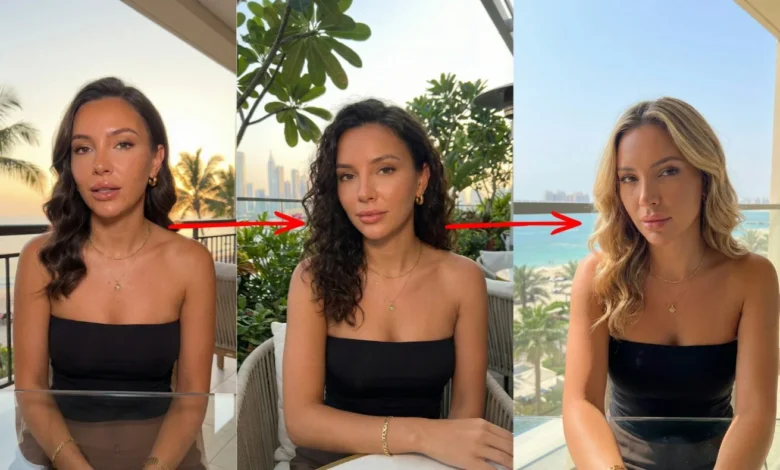
The first time I tried to cut together a sequence from separate generations, I ended up with three different people. Same prompt, same described character — a woman in her thirties, dark hair, grey coat — and three clips in which she had visibly different faces, a coat that shifted from charcoal to slate, and hair that changed length between shots. Individually each clip was fine. Cut together they were unusable, because the thing a viewer tracks across an edit is precisely the thing that had failed to stay put.
This is the central problem in producing anything longer than a single shot, and it is worth understanding why it happens before reaching for solutions. Seedance 2.0 handles it better than the models I was using a year ago, but “better” still means a workflow rather than a checkbox.
A generation is an independent event. The model is not remembering a character between requests; it is producing a plausible interpretation of a description each time it is asked. “A woman in her thirties with dark hair” describes an enormous space of possible people, and each generation samples a different point in it. Adding more descriptive detail narrows the space but never closes it, which is why the intuitive fix — writing a longer, more precise character description — produces diminishing returns fast. Twenty words of description gets much closer than five. Two hundred words gets barely closer than twenty.
A note on tooling before going further: I run most of this through Seevio.ai, which is where Seedance2.ai moved to earlier this year — the name and address changed, the accounts and models didn’t. Anyone picking up an older workflow can find what carried over documented there.
The easiest win is staying inside one generation
Before doing anything complicated, it is worth noting that a single Seedance 2.0 generation can contain multiple shots — cuts and angle changes within one output rather than one continuous take. Consistency inside a single generation is handled by the model rather than by the operator, and it holds up far better than anything stitched together afterwards.
This has an obvious limit, which is the per-generation duration ceiling. But a surprising amount of short-form work fits inside it. A three-shot product sequence, a quick establishing-to-close-up move, a reaction cut — these can often be requested as one generation rather than assembled from three. When they fit, they should be, because it removes the consistency problem entirely rather than managing it.
Reference images do what descriptions cannot
Once the sequence outgrows a single generation, reference images become the primary tool, and the shift in thinking they require is from describing a character to supplying one.
Seedance 2.0 accepts up to nine reference images in a single generation, and the way to think about them is not as hints. A reference image is not a suggestion about what the character looks like. It is the character. Attached to a generation and addressed from within the prompt, it fixes the specific facial structure, the specific garment, the specific detail — rather than a description that could match many people. Reusing the same reference across every generation in a sequence is what holds appearance together, and it works considerably better than any amount of text.
What makes a reference set effective took me a while to work out. A single front-on image is a weaker anchor than two or three showing the subject from different angles, because the model has to infer the unseen sides either way and does it more reliably with evidence. Neutral lighting in the reference is better than dramatic lighting, since strong shadow gets read as part of the subject’s appearance and follows into shots where it makes no sense. And the reference should show what actually needs to stay constant — if wardrobe matters, the reference needs to include it, because a head-and-shoulders crop will not hold a coat.
The same mechanism handles products and logos, which is the more commercially consequential case. A client’s product has to appear as it is, not as the model imagines something in that category. Supplied as a reference, it holds. Described in text, it doesn’t.
Locking the variables that aren’t the character
Character consistency is only half of continuity. A perfectly consistent person in shifting light, against a background that changes character between shots, still reads as broken.
I write lighting into every prompt in a sequence using identical wording — not paraphrased, literally the same clause. “Late afternoon sun from camera left, warm, long shadows” repeated verbatim across four prompts produces far more consistent results than four different descriptions of the same lighting condition. The same goes for the environment and the overall style register. Anything that should not change gets copied rather than rewritten.
Fixing the Seedance 2.0 seed parameter removes another variable. With the same prompt, the same references, and the same seed, the remaining differences between generations come from the parts of the prompt that actually differ, which makes iterating on a sequence far more predictable than fighting sampling variation at the same time.
Chaining shots for true continuity
Where one shot has to flow directly into the next — a continuous movement broken across two generations — the first-frame and last-frame parameters in Seedance 2.0 are the mechanism. Ending a clip on a specified frame and beginning the next from it produces a genuine join rather than a similar-looking one.
This works, and it is not invisible. The join is smoother on some cuts than others, and my consistent experience is that it holds better when the cut falls where a real edit would fall. Cutting on an angle change, or at a natural pause in the action, hides small inconsistencies that a seamless continuous movement would expose. This is ordinary editing craft rather than anything specific to generated video — cutting on motion has always covered a multitude of sins — but it applies with more force here.
Planning a sequence with this in mind changes how it gets broken down. Rather than writing a continuous action and dividing it wherever the duration limit falls, it works better to design the shot list around cuts that are meant to be cuts, then generate each one.
What still doesn’t hold
Hands remain the weak point. A character can be perfectly consistent across four shots and have different hands in each one, particularly when doing anything specific with them. I plan around it — framing that keeps hands out of shot, or accepting extra generations for the ones where they matter.
Two characters interacting is harder than one character alone, and the difficulty compounds rather than adds. Both need to hold, and they need to hold in relation to each other. This is where I budget the most attempts.
Anything with legible text — a name badge, packaging copy, signage — will not survive across shots and often will not survive within one. It goes on in post.
And there is a category of subtle drift that is easy to miss until the edit: a face that is recognisably the same person but sits slightly differently, a garment whose weight changes, a hairstyle a few centimetres off. None of it is wrong enough to notice in isolation. All of it is visible on a cut. Reviewing shots side by side rather than sequentially catches this earlier.
The working method
What I actually do now on Seedance 2.0, for anything that needs to hold together: build the reference set first, before writing any prompts. Two or three images, neutral light, covering whatever must stay fixed. Write one prompt establishing lighting, environment, and style, and treat that block as fixed text to be pasted into every shot in the sequence. Vary only the action and the camera per shot. Fix the seed. Draft everything short and low-resolution, review the drafts together as a set rather than one at a time, and only then re-run at delivery settings.
Platforms exposing the full parameter surface make this workable — the references, seed, and frame controls all need to be reachable, and simplified interfaces that hide them make consistent sequence work considerably harder. Seedance 2.0 is available through several, and the ones worth using are those that don’t abstract the controls away.
None of this makes consistency automatic. What Seedance 2.0 provides is the control surface — references, seed, frame chaining — that turns consistency into a process with known failure points rather than a matter of luck. In practice that is the difference between a sequence that cuts together and three clips of three different people.