Seedance 3.0: A Practical Way to Plan Video Stories for Small Online Shops
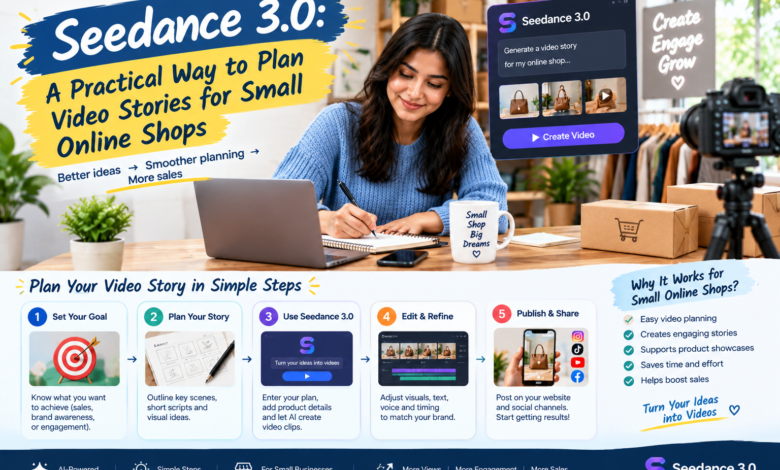
A small online shop can have excellent product photographs and still struggle to explain why an item belongs in someone’s day. A ceramic mug against a plain background shows its shape. A short scene of a quiet desk or a weekend breakfast suggests a setting in which a customer might use it. The challenge is to tell that story without misrepresenting the product.
A video creation platform such as Seedance 3.0 can help a shop explore supporting visual ideas before assembling a finished piece. The most useful starting point is a modest story with a clear boundary: real product information remains accurate, while generated scenes provide atmosphere or a visual concept for review.
Pick one everyday situation
Consider an independent shop selling handmade notebooks. A video does not need to describe every paper type, cover colour, and binding option. It might focus on someone planning the coming week at a kitchen table. That situation gives the shop a reason to show the notebook without turning every frame into a product claim.
Write down the intended message in ordinary language. Perhaps the notebook is being presented as a place to collect ideas during a busy morning. Keep the message separate from claims about durability, materials, or performance, which need their own evidence. An attractive scene should not quietly suggest that an item is waterproof or indestructible.
Choosing a narrow situation also makes the creative work easier to judge. If the clip feels like an elaborate office advertisement when the audience is buying a personal journal, the direction needs adjusting. A simple story provides a useful reference for those decisions.
Decide which images must show the real item
Seedance 3.0 includes image and reference based video workflows, but a reference does not remove the need to check the result. Product proportions, surface details, and small markings can change in generated footage. Use controlled photographs or recordings wherever the customer needs an accurate view of the item being sold.
Generated footage may be more suitable for an opening scene, a transition, or an illustration of a general setting. A morning light across an uncluttered table can establish atmosphere before the video cuts to an actual close-up of the notebook. That division gives each type of image a clear job.
Keep factual labels and product names in an editing layer that can be reviewed directly. If the shop uses a particular shade name or describes a specific paper weight, copy the approved wording from the product information. Do not rely on generated text inside the scene to communicate those details correctly.
Keep the visual brief compact
A useful brief names the setting, the subject, the action, and the intended mood. For the notebook example, that might be a calm morning scene with a hand placing a closed journal beside a cup. The camera can remain still or move gently. Additional visual instructions should support that simple action rather than compete with it.
When trying alternatives in Seedance 3.0, change one major element at a time. A different lighting direction may be enough to shift the mood. Changing the room, the subject, the colours, and the camera simultaneously makes it harder to understand which choice improved the result.
Use references that the shop owns or has permission to use. A small collection of consistent images is usually easier to work with than a large folder of conflicting styles. Note why each reference was selected so another team member can understand the direction without guessing.
Let the edit carry the product information
The generated scene is only one part of the finished video. Place it in an editing timeline alongside accurate product images and a short information card. Watch the sequence without narration first. The viewer should understand the basic situation before additional explanation is added.
A Seedance 3.0 draft can help test the transition from atmosphere to product detail. If the opening is so elaborate that the real item feels like an interruption, shorten it. The story should guide attention toward the product’s ordinary use, not make viewers wait through a miniature film before understanding what they are seeing.
Keep the ending useful. A product name and a clear next step may be enough. Repeated promotional slogans can make a small, thoughtful piece feel louder than the shop’s usual voice. Match the wording to the tone customers already encounter in the shop’s descriptions and support messages.
Review on the screen customers will use
A video that works on a large monitor may be difficult to read on a phone. Check the exported file at a realistic display size. Captions should remain readable, the product should be easy to identify, and important details should not depend on a tiny background element.
If both portrait and landscape versions are needed, plan the framing for each. Cropping a wide composition can remove the object that makes the scene understandable. Review the final versions separately rather than assuming that a successful first export guarantees a successful second one.
Sound should support the scene without carrying all the meaning. Some viewers will watch silently. Captions and the accompanying post should explain essential information, while the image provides a clear visual path through the story.
Compare drafts against the same question
After producing a few Seedance 3.0 candidates, ask a colleague which version makes the everyday situation clearest and why. Separate that judgment from personal preference about colour or music. Specific feedback such as “the notebook is difficult to notice until the last frame” points to an actionable edit.
Keep notes on preparation, generation, review, and editing time. Those stages matter when deciding whether the approach fits the shop’s workload. A process that creates appealing drafts but requires extensive correction may be better suited to occasional campaigns than routine product updates.
Build a repeatable habit around a small story
Save the selected references, approved wording, and final files together. The next project can reuse the organisation and review method while telling a different story. That provides consistency without publishing the same visual treatment for every item in the catalogue.
For a small shop, Seedance 3.0 is most useful when it supports a believable connection between an item and everyday life. Start with a situation customers recognise, keep product information grounded in reality, and let the final edit remain simple. A clear story can make the item easier to understand without demanding an exaggerated sales pitch.