Stop Wasting Video Content: How a Free YouTube Transcript Generator Unlocks Hidden Value
You spend hours scripting, filming, and editing a YouTube video — then publish it and move on. But here’s the uncomfortable truth: without a transcript, up to 80% of that content’s potential is simply left on the table.
Search engines can’t watch videos. They read text. And your audience? A significant chunk of them scroll with the sound off, work in noisy environments, or simply prefer reading to watching. A youtube video to text converter bridges that gap — instantly, and often without you lifting a finger.
This guide breaks down exactly what YouTube transcripts are, why they matter more than most creators realize, and how to use them strategically across three real-world scenarios.
What Is a YouTube Transcript — and Why Should You Care?
A YouTube transcript is a text version of everything spoken (and sometimes captioned) in a video. YouTube auto-generates captions for most uploaded videos, and from those captions, a full transcript can be extracted.
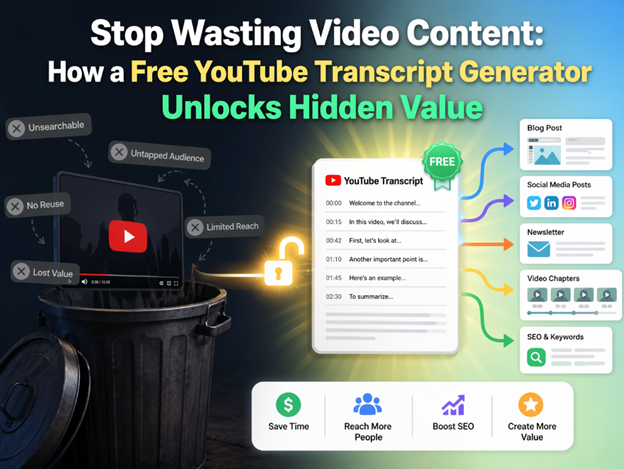
But here’s where it gets interesting. A raw transcript isn’t just a accessibility feature — it’s a content asset. Think of it as a first draft that already exists. You can turn it into:
- A long-form blog post or article
- A social media caption series
- An email newsletter summary
- Searchable documentation or FAQ pages
- A podcast show notes page
The key is getting the transcript out quickly and cleanly — which is exactly where a free YouTube transcript generator earns its keep.
How a Free YouTube Transcript Generator Actually Works
Most tools work by pulling the auto-generated captions from YouTube’s own API. You paste in a video URL, hit a button, and within seconds you have a clean block of text — sometimes with timestamps, sometimes without.
Some tools go further: they can detect the language, translate the transcript, or strip out filler words before handing you the output. The best ones require zero sign-up and work directly in the browser.
Quick tip: YouTube’s own built-in transcript viewer (three dots → “Open transcript” on any video) is free and underused. It’s not the flashiest tool, but for a single video, it’s the fastest starting point you’ll find.
What to look for in a good tool
- No account required — friction kills momentum
- Timestamp toggle — useful for referencing specific moments
- Copy-to-clipboard or download option
- Multi-language support if you work with international content
- Clean output with minimal formatting artifacts
3 Real-World Use Cases That Show the Power of YouTube Transcripts
Use Case 01:The Blogger Who Doubled Her Publishing Output
A food creator was posting one YouTube video per week but struggling to maintain her blog. She started using a free YouTube transcript generator to pull the spoken content from each video, then spent 20–30 minutes editing and expanding the transcript into a proper blog post. Result: consistent weekly blog content, improved search rankings for recipe keywords, and a second traffic stream she hadn’t built intentionally. Her video about “one-pan pasta” became one of her top-ranking articles within three months — purely because the transcript gave her a content foundation she actually finished.
Use Case 02:The SaaS Company That Repurposed a Webinar Into a Lead Magnet
A B2B software company recorded a 45-minute product walkthrough webinar and uploaded it to YouTube. Using a transcript tool, they extracted the full text, edited it for clarity, and reformatted it as a downloadable PDF guide. That guide was gated behind a lead form and generated over 400 email sign-ups in its first month. The video had 900 views. The PDF reached people who would never have sat through the full webinar — a completely different audience segment, unlocked by one transcript export.
Use Case 03:The Educator Who Made His Content Accessible
A university lecturer posted lecture recordings to YouTube for his students. Many students were non-native English speakers who struggled with spoken delivery at speed. By generating transcripts and sharing them alongside each video, comprehension improved noticeably — verified through end-of-week quiz scores. He didn’t hire a transcription service or spend extra hours. He used a free tool, copied the output into a shared Google Doc, and that was it. Accessibility and usability, in under five minutes per lecture.
SEO Benefits of YouTube Transcripts You Probably Aren’t Exploiting
Search engines index text. Video content, by default, is largely invisible to Google’s crawlers unless you provide textual context. Embedding a transcript on the same page as your video — or publishing a companion article — gives Google something concrete to index.
Here’s what that means in practice:
- Long-tail keywords spoken naturally in conversation get picked up by search
- Transcripts create internal linking opportunities to related content
- Time-on-page increases when users read along while watching
- Structured transcript content can appear in featured snippets
The irony is that the content is already there — it came out of your mouth. A free YouTube transcript generator simply makes it visible to the systems that matter.
Common Mistakes to Avoid When Using Transcripts
Publishing raw transcripts without editing
Auto-generated transcripts are imperfect. They miss punctuation, mishear words, and don’t capture structure. Treat the raw output as a rough draft — not a finished product. A 10-minute editing pass transforms a garbled wall of text into readable content.
Ignoring non-English content
If you create content in multiple languages, most transcript tools support translation. A Spanish-language tutorial transcript can become an English article — doubling your reach without doubling your production time.
Forgetting timestamps for long videos
For videos over 20 minutes, timestamped transcripts are genuinely useful for readers who want to jump to a specific section. Include them. It reduces bounce rate and improves user experience.
Final Thought
Every YouTube video you’ve published already contains a written article, a newsletter, a social post, and a lead magnet. It’s all sitting there in the audio, waiting to be extracted. Saeto AI free YouTube transcript generator is the simplest possible tool for making that happen — no budget, no lengthy workflow, no excuse.
Start with one video you published in the last month. Pull the transcript, spend 20 minutes editing it, and publish it as a companion blog post. That single experiment will show you exactly what you’ve been leaving behind.